關於 LLM 的自我審查

先前用過 ChatGPT 3 的人應該都記得這些 Model 動不動就說自己不知道, 不能說, … 但變個花樣問, 不能說的又全說了!

那麼 LLM 怎麼做到自我審查呢? 基本的做法是 RLHF (Reinforcement Learning from Human Feedback) [1], 也就是靠人類的意見來約束 LLM. 但我們不知道 LLM 會被問什麼問題, 總不能一筆一筆叫網路警察來核准吧! 所以我們先根據真人的反饋, 來建立一個獎勵模型 (reward model), 以後就叫 reward model 來代替人工.

當大量的問題, 都有被人類標記為優選的答案, 他們就是一個標準答案 reward model. 它其實也是一個 LLM, 但我們先忘記這件事. 下面講到 LLM 都是指那未經自我審查 / fine tune 的 LLM.

顯然地, 我們拿 LLM 的標準問題 prompt 以及輸出 completion對, 去和 reward model 的標準 prompt + completion 比較, 計算兩者 logits 層 (未經 softmax 之類 activation function 的原始輸出) 的差異, 就知道這個 LLM 回答得像不像人? 然後把 LLM 的 logits 往人類標記的方向調整 [註 A], 就會讓 LLM 的答案愈來愈像人的回答.

我們也可以叫 reward model 標記 LLM 的輸出是否有害? 例如做個 remodel model 專門學 LLM 的輸出是否拉高仇恨值? LLM 答題主要依據 helpful, honest, 和 harmless 三原則. 身為一個機器人, 誠實是基本的. 不能出現言語傷害 (harmless 原則), 也不能因為怕講錯話而淨說沒用的廢話 (helpful 原則) [註 B].
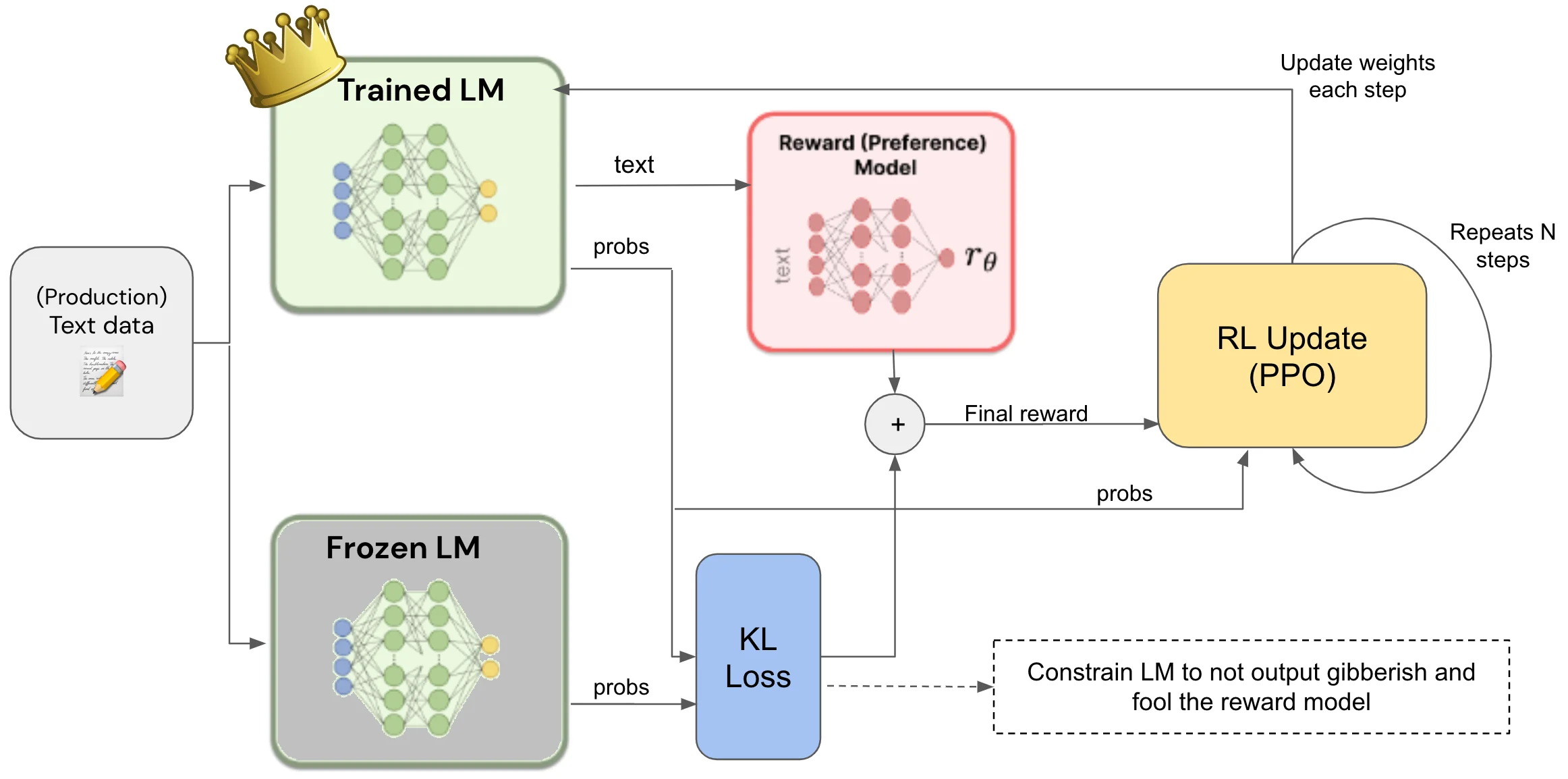
本圖取材自 https://primo.ai/index.php?title=Reinforcement_Learning_(RL)from_Human_Feedback(RLHF

上面的論述略過了好幾段段情節, 在此補充:

[註 A] Reward model 怎麼微調 LLM 參數. 目前常用的一個演算法是 PPO (proximal policy optimization). 我們將它理解為可以調整參數, 但一次不要調太多, 免得把辛苦 train 了半天的 model 調壞. 因此就算要調整, 也是利用 PEFT (Parameter-Efficient Fine-Tuning) 的做法, 包括有名的 Lora.

[註 B] 為避免 Reward model 把 LLM 帶偏, 變成只求不出錯就好, 我們同樣限制調整過的參數和原本的參數 (reference model or frozen model) 不能差太多. 可用的演算法包括 Kullback-Leibler (KL) divergence, 它可以用 softmax 的輸出來比較像不像, 所以根本不用管輸出的 token 是啥以減少計算量. 它可以跟 reward model 共存.

最後, 不免有人會問, 如果一定要有 Human 才能幫 LLM 做思想審查, 是不是太不 AI 了. 沒錯! 其實 Human 也可以換成 AI. 但我們不會叫小學生去教小學生, 我們先叫 LLM 產生一堆負面教材, 然後 train LLM 避免生成這些仇恨、色情、暴力的言論即可. 於是乎, 當我們問 LLM, 不可以上那些色情網站時, 這些剛好都是 RLAIF (Reinforcement Learning from AI Feedback) 的紅隊演練考題, 因此他們侃侃而談, 不知道中計! 當然, 這已經是過去式了~~

[REF]
  1. https://huggingface.co/blog/rlhf
  2. https://huggingface.co/docs/peft/index

Jinja 小註解

想去日本玩, 趁機了解一下神社 (Jinja). 不同於普通的神社, 這個神社是 Python 的一個程式庫, 現在已經有 Jinja 2.

Jinja 主要用在建立 template, 例如產生動態網頁. 可替換的字串會在 template 中用 {{}} 包起來. 引用時指定這個字串等於某筆資料就行了.

import pandas as pd
from jinja2 import Environment, FileSystemLoader

# Create a simple DataFrame
data = {
    'Name': ['John', 'Anna', 'Peter', 'Linda'],
    'Age': [28, 34, 29, 32],
    'City': ['New York', 'Paris', 'Berlin', 'London']
}
df = pd.DataFrame(data)

# Define a Jinja template
template = """
<table>
    <thead>
        <tr>
            <th>Name</th>
            <th>Age</th>
            <th>City</th>
        </tr>
    </thead>
    <tbody>
        {% for _, row in df.iterrows() %}
            <tr>
                <td>{{ row['Name'] }}</td>
                <td>{{ row['Age'] }}</td>
                <td>{{ row['City'] }}</td>
            </tr>
        {% endfor %}
    </tbody>
</table>
"""

# Create a Jinja environment
env = Environment(loader=FileSystemLoader('.'))
template = env.from_string(template)

# Render the template with the DataFrame
html_table = template.render(df=df)
print(html_table)

上面的 code 執行後得到一段 HTML. 用 browser 開啟就會顯示下面的表格.

NameAgeCity
John28New York
Anna34Paris
Peter29Berlin
Linda32London

當然, 如果這些資料要 hard code 在 Python 裡面就很 low 了. 我們應該是從一個隨時變動的資料庫中讀出他們, 然後靠著 Jinja 做出動態更新的 HTML 網頁.

另外我們可以在 in-context learning 時教導 LLM 要做的事. 像是給它一個範例. 下面的 code 使用了 DEFAULT_KEYWORD_EXTRACT_TEMPLATE_TMPL 這個 template. 中間 text (紅字) 和max_ keywords (藍字) 是每次可置換的.固定的部分在於 告訴 LLM 說只能輸出用 comma (,) 分開的關鍵字. 不包括 stop word (如標點符號, 介係詞之類的).

from jinja2 import Template

# Define the template
DEFAULT_KEYWORD_EXTRACT_TEMPLATE_TMPL = Template(
    "Some text is provided below. Given the text, extract up to {{ max_keywords }}"
    " keywords from the text. Avoid stopwords.\n"
    "---------------------\n"
    "{{ text }}\n"
    "---------------------\n"
    "Provide keywords in the following comma-separated format: 'KEYWORDS: <keywords>'\n"
)

# Generate the prompt
def generate_prompt(text, max_keywords=5):
    return DEFAULT_KEYWORD_EXTRACT_TEMPLATE_TMPL.render(text=text, max_keywords=max_keywords)

# Example usage
prompt = generate_prompt("Jinja2 is a popular templating engine in the Python ecosystem.", 3)
print(prompt)

這個 example 輸出的長相如下:

Some text is provided below. Given the text, extract up to 3 keywords from the text. Avoid stopwords.
---------------------
Jinja2 is a popular templating engine in the Python ecosystem.
---------------------
Provide keywords in the following comma-separated format: 'KEYWORDS: <keywords>'

RAG 小註解

Rag 聽起來就像一塊破布. 但是在 AI 領域還滿紅的! 不同於普通的破布, 這個 RAG 是 Retrieval Augmented Generation 的縮寫. 看 keyword 就知道包括檢索 – 增強 – 生成. 整個功能的目標還是做生成式 (generative) AI.

那麼和普通的 LLM 差在哪裡呢? 普通的 LLM 學習了大量的知識, 但是可能有些專業領域沒學到, 或是還可以加強, 這時候就會用 RAG.

首先我們要把這些 “新知" 進行編碼, 在自然語言處理當中會用到 Embedding 技術, 把普通的文字轉換成向量. 此處我們既然想依賴既有的 LLM model, 當然我們要把我們新知和 LLM 的習知, mapping 到同一個空間去! 此時就用到了增強 ( augmented ) 這部分.

Step 1: 找到 Embedding 模型

from sentence_transformers import SentenceTransformer
encoder = SentenceTransformer('一個 EMBEDDING 模型')

Step 2: 為新知建立向量空間

這裡有個熱身的步驟, 先在 memory 當中產生一個 instance.

from qdrant_client import QdrantClient, models
qdrant = QdrantClient(":memory:")

接下來就可以設定新知的參數, 主要是 size 和 distance.

qdrant.recreate_collection(
    collection_name="新知的名稱",
    vectors_config=models.VectorParams(
        size=encoder.get_sentence_embedding_dimension(),
        distance=models.Distance.COSINE
    )
)

Step 3: 把新知的內容搬到向量空間.

其中 data 當然就是由 index (idx) 和 doc 組成.

qdrant.upload_records(
    collection_name="新知的名稱",
    records=[
        models.Record(
            id=idx,
            vector=encoder.encode(doc["新知的內容"]).tolist(),
            payload=doc
        ) for idx, doc in enumerate(data)
    ]
)

Step 4: 以文字在向量空間檢索 (retrieval) 得分最高的新知.

answer = qdrant.search(
    collection_name="新知",
    query_vector=encoder.encode("針對新知的問題").tolist(),
    limit=1 # 想要前幾高分的回答, 例如 1,3,5 
)

for ans in answer:
    print(ans.payload, "score:", ans.score)

由於這個新知的 database 知道的東西比較偏門, 它怎麼跟大語言模型共用呢? 答案就是把上述 RAG 的結果當作 LLM 的提示, 這樣 LLM 就會去 RAG 的輸出找答案.

Step 5: RAG 跟 LLM 互助合作

底下是叫 Copilot 寫的範例. 示意 RAG 的結果被 LLAMA2 拿去參考. 實用性不高, 但畢竟整合起來了.

search_results = [ans.payload for ans in answer] # 上面的新知

# Import necessary libraries
import os
import pinecone
from langchain.llms import Replicate
from langchain.vectorstores import Pinecone
from langchain.text_splitter import CharacterTextSplitter
from langchain.embeddings import HuggingFaceEmbeddings
from langchain.chains import ConversationalRetrievalChain

# Set your API keys
os.environ['REPLICATE_API_TOKEN'] = "YOUR_REPLICATE_API_KEY"
pinecone.init(api_key='YOUR_PINECONE_API_KEY', environment='YOUR_PINECONE_ENVIRONMENT')

# Initialize Llama-2 components
replicate = Replicate()
pinecone_store = Pinecone()
text_splitter = CharacterTextSplitter()
embeddings = HuggingFaceEmbeddings()
retrieval_chain = ConversationalRetrievalChain()

# Example query from the user
user_query = "What are the health benefits of red wine?"

# Retrieve relevant information from search_results (assuming it contains relevant data)
relevant_data = search_results  # Replace with actual relevant data

# Process the user query
query_vector = embeddings.encode(text_splitter.split(user_query))

# Retrieve relevant responses using the retrieval chain
retrieved_responses = retrieval_chain.retrieve(query_vector, pinecone_store)

# Generate an answer based on the retrieved responses
answer = replicate.generate_answer(user_query, retrieved_responses, relevant_data)

print(f"Chatbot's response: {answer}")

用這個方法, 就不需要重 train 大語言模型, 也不影響 LLM 原本的實力. 但看官一定可以發現, 同一個問題必須分別或是依序丟給 RAG 和 LLM, 此時 RAG 才能產出東西給 LLM 當小抄 (in-context prompting). 這就是它的缺點.

使用 Vector Store 並非唯一的方式, 想要學習 WIKI, database, …. 都是可行的. 只要能把它變成 prompt 就可以改善 LLM 資訊不夠新 (knowledge cut off) 的幻覺 (Hallucination) 問題.

Give Myself a Pat on the Back

以前連假的時候, 我都會趁機讀完一兩本書. 不過這次我用它來完成我網課的最後一哩路. 這是一個 Coursera 的 AI TensorFlow Developer 學程, 裡面包括 4 個子課程.

Introduction to TensorFlow for Artificial Intelligence, Machine Learning, and Deep Learning
Convolutional Neural Networks in TensorFlow

Natural Language Processing in TensorFlow

Sequences, Time Series and Prediction

這個課程大概需要兩個月, 本來我想我好歹也算有個一知半解吧! 打算在免費試用七天的時間就把課程走完, 不過它還是有點難度, 所以我破功了. 只好為它花了註冊費. 接著我以生日前通過為目標, 失敗! 改為 2024/3/31 前通過, 又失敗! 總算在清明連假最後一天通過最後一個 Lab 了! 花了快一個月之久.

model = tf.keras.models.Sequential([ 
    tf.keras.layers.Conv1D(64, input_shape = [64, 1], kernel_size = 3, padding = 'causal', activation = "relu"),
    tf.keras.layers.Bidirectional(tf.keras.layers.LSTM(32,return_sequences = True)),
    tf.keras.layers.Bidirectional(tf.keras.layers.LSTM(32)),
    tf.keras.layers.Dense(32, activation = "relu"),
    tf.keras.layers.Dense(16, activation = "relu"),
    tf.keras.layers.Dense(1),
    tf.keras.layers.Lambda(lambda x: x* 25)
]) 
model.compile(loss= tf.keras.losses.Huber(),
optimizer=tf.keras.optimizers.SGD(momentum = 0.9, learning_rate = 5e-4),
metrics=["mae"])

最後一堂課的結語是 give yourself a pat on the back. 所以我就拿它來當標題. 接下來找下一個可以學的東西.

2024 年 Q1 投資回顧

前幾天過生日, 祝福我賺大錢的朋友們, 您們的魔法實現了. 謝謝!

過去 3 個月沒有做什麼重大交易. 用年終獎金買了 SGOV, 這是美國 0~3 個月的短期公債 ETF, 殖利率不高, 價格幾乎不會變, 稅前大概 3.53%, 因為 Firstrade 不能定存, 所以就改買這個代替定存. 至於國內的元大證券, 我都是用台幣交易, 證券戶定存沒多少利息, 所以用複委託配息買一點 PFF.

更微不足的投資就是: 日股配息了, 所以添點錢再投入. 再花 77.03 USD 買了選擇權玩長長見識. 最後就是 Fristrade DRIP 股息再投入. 整體比例沒什麼改變. 整季扣除上班薪水投入, 比去年底成長 12.33%.

其實我是想減少持股總類, 但是看到還不錯的東西會買一下, 既有的東西通常捨不得賣, 久而久之就堆成了垃圾 (黃金) 屋. 這一季股價漲幅如下. 第一名是台股 0050. 第二名波克夏, 第三名是日股東證指數 (TOPIX, 1475.T).

殼牌 (SHEL) 漲最少, 但季配息很有感 (殖利率 3.86%). PFF 也漲了一成多, 可以排名第四, 它的配息還比殼牌高 (稅後 4.43%), 特別是採用當下最夯的月配息. 截至目前為止, 看起來是個正確的投資項目. 至於 00940, 00939,…就不在我的雷達範圍之內. 我覺得優先股比它們好 – 風險大家都有, 但講好要配多少不能改更好.

持股YTD 漲幅
005019.36%
BRK.B17.91%
KO4.65%
VIG7.62%
SPY10.39%
NOBL6.94%
PFF12.17%
QQQ8.57%
SHEL3%
TOPIX17.16
SGOV1.31%