LCEL 與 Agent

LCEL 全名 LangChain Expression Language, 是一種描述 LangChain 架構的語言。最大的特徵就是看到 A = B | C | D 這種表示法 – 說明了 LCEL 串接多個可執行單元的特性,是 LangChain 的進階實現。而 ‘|’ 的理解和 Linux 的 pipe 很像,它是非同步的串接。

舉例來說,一個 LLM 的 LangChain 可以表示為:

chain = prompt | LLM model | Output Parser

依序做好這三件事:有方向性的提示、強大的大語言模型、友善的輸出格式,就可以提升使用者體驗。

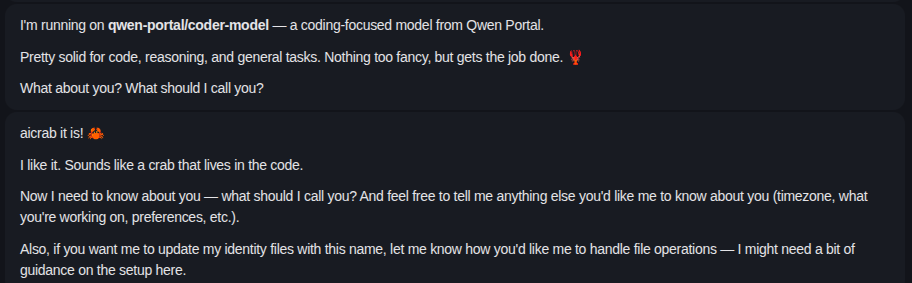
但是顯然這樣還不太夠,比方說,LLM 需要查一筆它沒被訓練過的資料,在上面的 pipe 就無法做到。換個例子,我想幫 AI 助理取個名字,它也會說好。但是一轉眼什麼山盟海誓都忘光了!

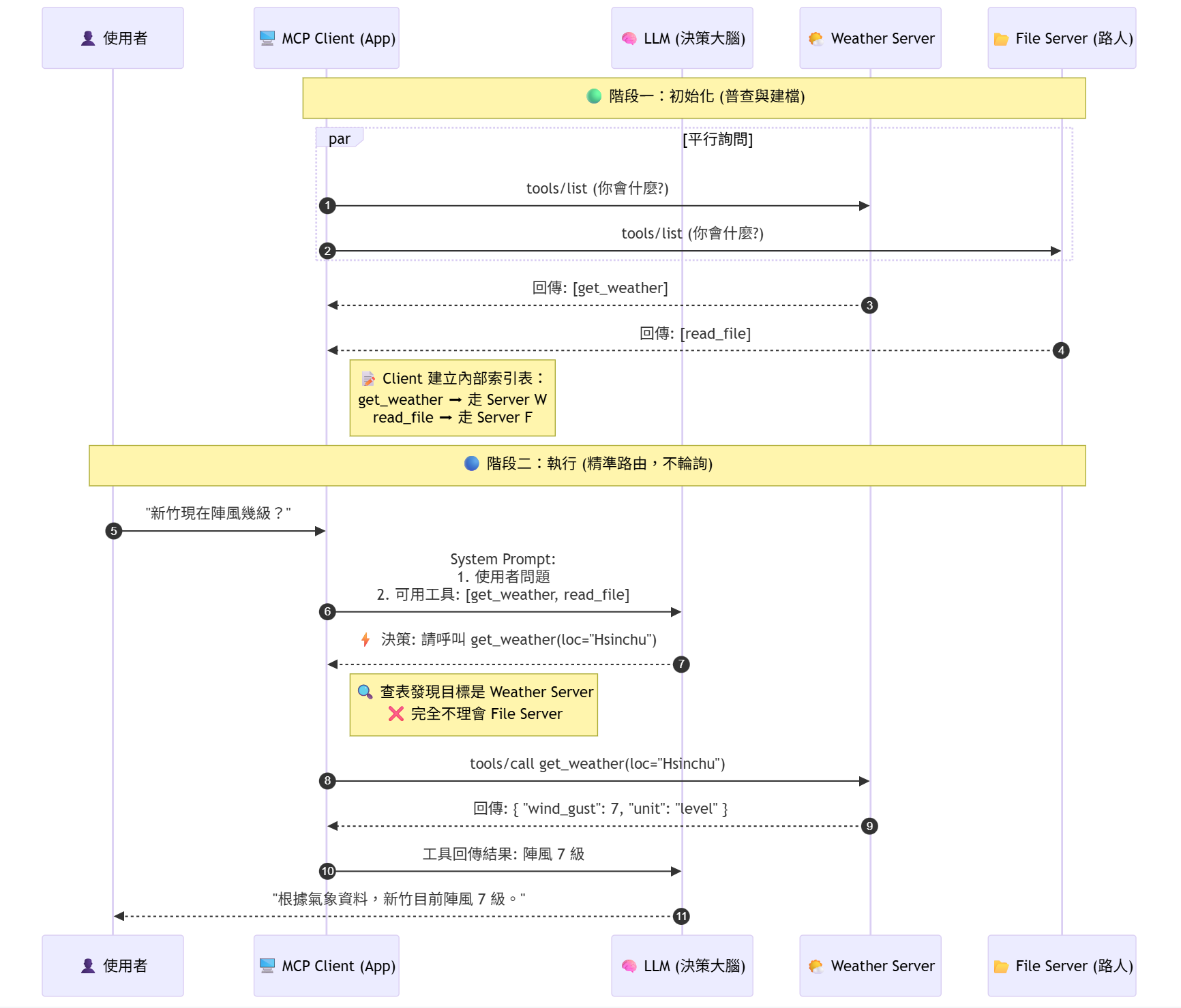
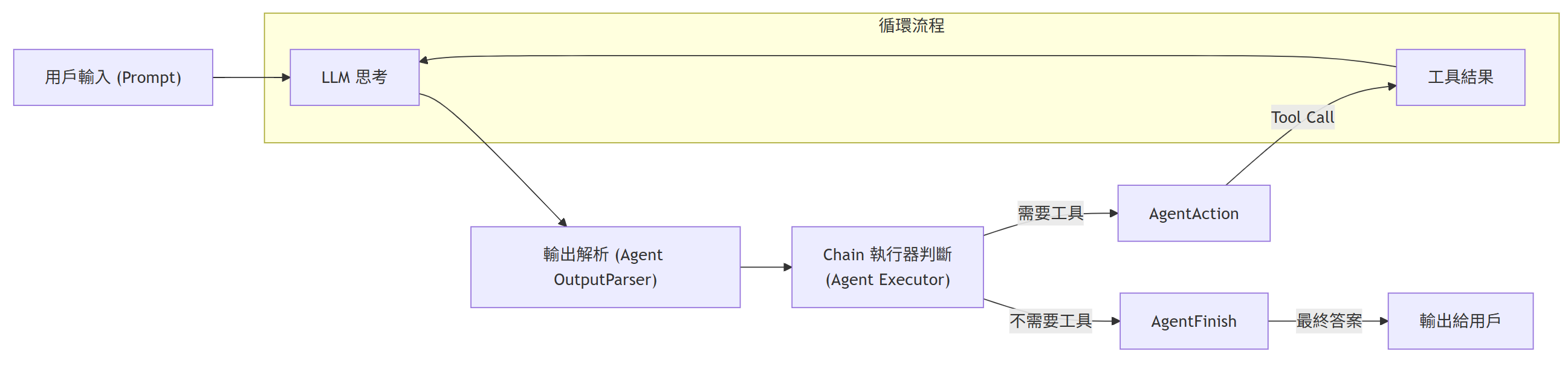
顯然,我們要有個負責的 agent,把 function call 的能力加進來;而且 call 完之後,還要餵給 LLM 做 “人性化" 的自然語言潤飾。這是一個循環的路徑,直到 AI 判斷它不再需要任何外部工具,就可以結束迴圈,跟使用者報告最終結果了。

那麼這個 code 長什麼樣子? 首先把基本元件準備好:

# 初始化模型
llm = ChatOpenAI(model="gpt-4o", temperature=0)

# 將工具打包成列表
tools = [get_current_weather] # 以問天氣的函式為例

# 給出配合 function 的 prompt
prompt = ChatPromptTemplate.from_messages(
    [
        ("system", "你是天氣助理,請根據工具的結果來回答問題。"),
        ("placeholder", "{chat_history}"),  # 預留給歷史訊息
        ("human", "{input}"), # 真正的輸入
        ("placeholder", "{agent_scratchpad}"), # 於思考和記錄中間步驟
    ]
)

創建 agent

# 創建 Tool Calling Agent
# 將 LLM、Prompt 和 Tools 組合起來,處理 Function Calling 的所有複雜流程
agent = create_tool_calling_agent(llm, tools, prompt)

執行 agent

# 創建執行器, 跑 模型思考 -> 呼叫工具 -> 再次思考 -> 輸出答案的循環
agent_executor = AgentExecutor(agent=agent, tools=tools, verbose=True)

設計人機介面

def run_langchain_example(user_prompt: str):
    print(f"👤 用戶提問: {user_prompt}")
    
    # 使用 invoke 運行 Agent,LangChain 會自動管理多輪 API 呼叫
    result = agent_executor.invoke({"input": user_prompt})
    
    print(f"🌟 最終答案: {result['output']}")

測試案例

# 示範一:Agent 判斷需要呼叫工具
run_langchain_example("請問新竹現在的天氣怎麼樣?請告訴我攝氏溫度。")

# 示範二:Agent 判斷不需要呼叫工具,直接回答
run_langchain_example("什麼是 LLM?請用中文簡短回答。")

這邊要留意的是,第一個問天氣的問題,LLM 顯然要用到 tool 去外面問,第二個問題不需要即時的資料,所以它自己回答就好。

意猶未盡的讀者可能好奇 function 長怎樣? 其實就很一般,主要的特色是用 @tool decorator。這樣可以獲得很多好處,最重要的一點是 agent 都認得它的 JSON 輸出,方便資料異步流動。

# LangChain 會自動將這個 Python 函數轉換成模型可理解的 JSON Schema
from langchain_core.tools import tool

@tool
def get_current_weather(location: str, unit: str = "celsius") -> str:
    if "新竹" in location or "hsinchu" in location.lower():
        return "風大啦! 新竹就是風大啦!"
    else:
        return f"我不知道 {location} 的天氣啦!"

另外,追根究柢的讀者可能想問,code 裡面怎麼沒看到 ‘|’? 它跑那裡去了? 沒錯,上面講的都是 agent,它比較進階,可以動態跑流程。反而 LCEL 只是 LangChain 的實行方式,它就是一個線性的 chain。

我們由奢返儉,回過頭來看 LCEL,它不能跟 agent 比,只能打敗傳統的 LangChain。標為紅色的是 LCEL 特色的 coding style。

def demonstrate_legacy_chain():
 
    # 定義模型
    llm = ChatOpenAI(temperature=0)
    
    # 定義 Prompt Template
    template = "Translate English text to Chinese: {text}"
    prompt = PromptTemplate(template=template, input_variables=["text"])
    
    # 建立 Chain (透過類別組合)
    # 缺點:語法較冗長,看不到資料流向,且 output 通常包含原始 meta data
    chain = LLMChain(llm=llm, prompt=prompt)
    
    # 執行
    input_text = "Make American Great Again!"
    result = chain.run(input_text)

VS

def demonstrate_lcel():
    
    # 定義模型
    model = ChatOpenAI(temperature=0)
    
    # 定義 Prompt Template, 使用更現代的 ChatPromptTemplate
    prompt = ChatPromptTemplate.from_template("Translate English text to Chinese: {text}")
    
    # 定義 Output Parser (將 AI Message 轉為純字串)
    output_parser = StrOutputParser()
    
    # 建立 Chain (使用 Pipe '|' 運算符)
    # 優點:Unix 風格管道,由左至右邏輯清晰,易於修改和擴展
    chain = prompt | model | output_parser
    
    # 執行
    input_text = "Make American Great Again!"
    result = chain.invoke({"text": input_text})

這兩個都是一次性的 Q&A。

  1. Functions, Tools and Agents with LangChain
R 小筆記 – 2

R 真是不一般, 首先它不像別的語言, index 是從 0 開始. 而是從 1 開始. 再來呢, 很多地方的 1 看起來是 1 但不是 1; 看起來是 0 但也不是 0; 2 也不是平常的 2. 底下舉例說明.

上次說到用 X predict Y, 像是身高預測. 因為最低身高不是 0, 這條 minimum error 的線是有截距的. 此時一般線性迴歸的斜率公式是:

  • 模型:y = α + βx
  • 斜率:β = r(x,y) × sd(y)/sd(x)

假設強制要求通過原點, 他的迴歸如下.

  • 模型:y = βx(無截距項)
  • 斜率:β = Σ(xy)/Σ(x²)

最後, 假設原本是有截距的迴歸, 但我把它的數據先做正規化, 那它會跟誰一樣嗎?

x <- c(1.2, 2.8, 3.5, 1.9, 4.1, 2.3, 3.8, 1.6, 2.9, 3.2)
y <- c(2.4, 5.1, 6.8, 3.2, 7.9, 4.1, 7.2, 2.8, 5.5, 6.1)

# 標準化(z-score normalization)
x_norm <- (x - mean(x)) / sd(x)
y_norm <- (y - mean(y)) / sd(y)

# 方法0:一般線性迴歸斜率公式
slope0 <- cor(x, y) * sd(y) / sd(x)

# 方法1:通過原點迴歸
slope1 <- sum(x * y) / sum(x^2)

# 方法2:先正規化後當作一般線性迴歸
slope2 <- cor(x_norm, y_norm) * sd(y_norm) / sd(x_norm) 

cat("有截距 - 不通過原點迴歸:", slope0, "\n")
cat("通過原點迴歸:", slope1, "\n")
cat("標準化後做一般回歸:", slope2, "\n")

結果我們會得到 slope0 ≈ 1.85, slope1 ≈ 1.94, slope2 ≈ 0.93, 三個都不一樣.

方法 0 和方法 2 當中, 因為按照定義 :

sd(x_norm) = sd(y_norm) = 1, mean = 0

而 correlation 方面: cor(x,y) 又等於 cor(x_norm, y_norm),

所以 sd(y)/sd(x) ≠ 1 的情況下, 會導致 slope0 ≠ slope2.

方法 1 是強制通過原點, 而原本最佳解可能是有截距的, 所以 slope0 也不太容易巧合和 slope1 、slope2 一樣.

上面講的還沒有發揮到 R 的精神, 我們用 lm() 重做一次.

x <- c(1.2, 2.8, 3.5, 1.9, 4.1, 2.3, 3.8, 1.6, 2.9, 3.2)
y <- c(2.4, 5.1, 6.8, 3.2, 7.9, 4.1, 7.2, 2.8, 5.5, 6.1)

# 標準化
x_norm <- (x - mean(x)) / sd(x)
y_norm <- (y - mean(y)) / sd(y)

# === 手動計算(原始方法) ===
slope0_manual <- cor(x, y) * sd(y) / sd(x)
slope1_manual <- sum(x * y) / sum(x^2)
slope2_manual <- cor(x_norm, y_norm) * sd(y_norm) / sd(x_norm)

# === 使用 lm() 實現 ===
# 方法0:一般線性迴歸(有截距)
model0 <- lm(y ~ x)
slope0_lm <- coef(model0)[2]  # 取斜率係數

# 方法1:通過原點迴歸(無截距)
model1 <- lm(y ~ x - 1)  # -1 表示移除截距項
slope1_lm <- coef(model1)[1]  # 只有一個係數

# 方法2:標準化後的一般迴歸
model2 <- lm(y_norm ~ x_norm)
slope2_lm <- coef(model2)[2]  # 取斜率係數

# === 比較結果 ===
cat("=== 手動計算 vs lm() 比較 ===\n")
cat("方法0 - 有截距迴歸:\n")
cat("  手動計算:", slope0_manual, "\n")
cat("  lm() 結果:", slope0_lm, "\n")
cat("  差異:", abs(slope0_manual - slope0_lm), "\n\n")

cat("方法1 - 通過原點迴歸:\n")
cat("  手動計算:", slope1_manual, "\n")
cat("  lm() 結果:", slope1_lm, "\n")
cat("  差異:", abs(slope1_manual - slope1_lm), "\n\n")

cat("方法2 - 標準化後迴歸:\n")
cat("  手動計算:", slope2_manual, "\n")
cat("  lm() 結果:", slope2_lm, "\n")
cat("  差異:", abs(slope2_manual - slope2_lm), "\n\n")

# === 顯示完整模型資訊 ===
cat("=== 完整模型摘要 ===\n")
cat("\n--- 方法0:一般線性迴歸 ---\n")
print(summary(model0))

cat("\n--- 方法1:通過原點迴歸 ---\n")
print(summary(model1))

cat("\n--- 方法2:標準化後迴歸 ---\n")
print(summary(model2))

我們可以看到 model1 <- lm(y ~ x – 1) , 它不是真的減 1, -1 表示移除截距項. 還可以表示為 y ~ 0 + x. 兩者等效.

再來 slope2_lm <- coef(model2)[2] 的 [2] 不是第三個係數. 其中, 第一個係數 [1] 就固定是截距, 第二個係數 [2] 就固定是斜率.

Rrrrrrrrrrrrrrrr 啊啊啊啊啊啊啊啊啊啊….. (聲音漸尖)

R 小筆記

Realtek 公司也簡稱 R, 不過應該沒有多少人用過 R 語言. 最近適逢要用到 regression model, 但網路課程幾乎都是用 R (歷史包袱), 而不是 Python, 所以我也試著瞭解用 R 來理解 regression model.

首先 library(UsingR) 載入基本套件, 然後用 x 來 predict y.

y = β0 + β1 * X

在程式中, 以 beta0 取代 β0 , 而 beta1 取代β 1 , 因為我們只是 predict, 並不是 assign 值給 y, 所以要求的是 minimum square error.

i=1n​(Yi−(β0​+β1Xi))2

為了增加趣味性, 課程舉例是用父母的身高預測小孩的身高. 我們可以理解到身高不會為 0, 所以有一個 beta0 撐著, 然後父母身高 X 乘上的 weighting beta1, 就可以預測小孩的身高. 當然, 我們又可以理解到這是在統計上才有意義, 對個案沒有意義.

lm(y~x) 就可以得到用 x 預測 y 的 linear model 的結果.

coef(lm(y~x)) 回報 coefficients beta0 和 beta1.

c(beta0, beta1) 用來產生向量.

舉例來說, x 和 y 用 c() 產生向量, 得出 linear model 後, model 再用 coef() 取出係數, 然後印出來.


x <- c(1, 2, 3, 4, 5)
y <- c(2, 3, 5, 7, 11)

# 建立線性回歸模型
model <- lm(y ~ x)

# 獲取模型係數
coefficients <- coef(model)  # This gives c(beta0, beta1)

intercept <- coefficients[1] # beta0
slope <- coefficients[2] # beta1

# 印模型係數
print(intercept)
print(slope)

# OR 一行印模型係數
print(coefficients)

其中 <- 表示 assign, 正式名稱為賦值運算子 (assignment operator), 和 C 的 pointer 反方向.

用 Python 其實也不會變囉嗦. 以這個例子來說, Python 可以輕鬆應對. 雖然 R 確實更簡潔一點點.

import numpy as np
from sklearn.linear_model import LinearRegression

x = np.array([1, 2, 3, 4, 5])
y = np.array([2, 3, 5, 7, 11])

# 建立線性回歸模型
model = LinearRegression()
model.fit(x.reshape(-1, 1), y)

# 獲取模型係數
intercept = model.intercept_
slope = model.coef_[0]

# 印模型係數
print(f"Intercept (beta0): {intercept}")
print(f"Slope (beta1): {slope}")

# OR 一行印模型係數
print(model)
 

DataLoader 和 Iterator 的差異

在 trace AI 課程中的訓練代碼時, 看到 iterator 和 DataLoader 同場出現時有點暈, 我想說這兩個做的事情不是一樣嗎? 所以花點時間將這個疑惑釐清.

先講結論: Iterator 是 design pattern, DataLoader 是 PyTorch 的 class.

Iterator 做為 design pattern 的好處是: 不用管 dataset 真正長什麼樣子, 每次都都抓出一包 data, 還用不到的先不抓, 等下次抓, 以節省記憶體.

那一包要抓多大呢? 透過 DataLoader 這個 class 取得 dataloader 這個 object.

然後 data_iterator 是個 iterator, iter() 把 dataloader 轉換成可迭代的 object.

first_batch 的 type 取決 Dataset, 主要就是一包 data. 而第一次呼叫 next() 拿到的是第一包, 而不是第二包.

from torch.utils.data import DataLoader, Dataset
...
dataloader = DataLoader(dataset, batch_size=32, shuffle=True)
....
data_iterator = iter(dataloader)
first_batch = next(data_iterator)

在 Tensorflow 中, 沒有 DataLoader, 但有 tf.data.Dataset. 效果也是一次抓一包.

import tensorflow as tf

# Create a basic dataset
dataset = tf.data.Dataset.range(10)

# Apply transformations (e.g., batch, shuffle)
batched_dataset = dataset.batch(2)

# Iterate through the dataset
for batch in batched_dataset:
    print(batch)

Pytorch 轉 ONNX 小筆記

基本上這個轉換有兩大類方法, 一類是用官方 tool 去轉, 另一類就是寫個 Python 小程式去做. 原先我都是嘗試後面這路, 但要顧慮的東西很多, 一下修語法, 一下 memory 爆掉, 而是默默出錯時也會轉出 model, 要測試過才知道它的智力有沒有受損?搞得滿累的.

當我再次卡在下面這個檔案限制時, 我就決定換方法了 (悔不當初).

RuntimeError: The serialized model is larger than the 2GiB limit imposed by the protobuf library. Therefore the output file must be a file path, so that the ONNX external data can be written to the same directory. Please specify the output file name.

官方做法其實很簡單, 唯一要顧慮的是 onnx, onnxruntime, onnxruntime_genai 這三個軟體有沒有跟系統衝突? 有沒有跟 NPU tool 衝突 ? 這些搞定就可以了. 用 CPU 也不會轉太久. 這次的障礙是 DeepSeek 跟我講錯指令, 下面這行跑起來找不到 builder.

python -m onnxruntime_genai.builder --model microsoft/phi-2 --precision fp16

我去 onnxruntime 安裝的目錄下找, 確實也沒有對應的程式, 所以我把 Monica 預設的 DeepSeek R1 切到提供第二個意見的 Claude Sonnet V3.7, 它就指出 DeepSeek 的錯誤了, 哈!正確指令如下:

python -m onnxruntime_genai.models.builder \
  --model microsoft/phi-2 \
  --precision fp32 \
  --output ./phi-2-onnx \
  --execution_provider cpu \
  --cache_dir ~/.cache/huggingface \
  --extra_options trust_remote_code=True

轉完之後, 當然要測試一下有沒有問題? 如果發現它答非所問, 應該就是轉錯了. 然而, 我發現 DeepSeek R1 寫的測試程式還是遜了一點, 所以我又讓 Claude 重寫一次.

import numpy as np
import onnxruntime as ort
from transformers import AutoTokenizer
from typing import List, Dict, Optional, Tuple
import time

class Phi2ONNXGenerator:
    def __init__(self, model_path: str, tokenizer_path: str = "microsoft/phi-2"):
        """初始化 Phi-2 ONNX 生成器"""
        # 載入分詞器
        self.tokenizer = AutoTokenizer.from_pretrained(tokenizer_path)
        self.tokenizer.pad_token = self.tokenizer.eos_token
        
        # 設定 ONNX 執行選項以優化效能
        sess_options = ort.SessionOptions()
        sess_options.graph_optimization_level = ort.GraphOptimizationLevel.ORT_ENABLE_ALL
        sess_options.intra_op_num_threads = 4  # 調整為您的 CPU 核心數
        sess_options.execution_mode = ort.ExecutionMode.ORT_SEQUENTIAL
        
        # 建立推理會話
        self.session = ort.InferenceSession(
            model_path, 
            sess_options=sess_options,
            providers=['CPUExecutionProvider']
        )
        
        # 獲取模型輸入輸出資訊
        self.input_names = [input.name for input in self.session.get_inputs()]
        self.output_names = [output.name for output in self.session.get_outputs()]
        
        # 模型常數
        self.num_layers = 32  # Phi-2 有 32 層注意力層
        self.head_dim = 80    # 每個注意力頭的維度
        self.num_heads = 32   # 注意力頭數量
        
        # 快取字首
        self.key_prefix = 'past_key_values.'
        self.key_suffix = '.key'
        self.value_suffix = '.value'

    def _initialize_kv_cache(self, batch_size: int = 1) -> Dict[str, np.ndarray]:
        """初始化 KV 快取為零張量,使用預分配記憶體"""
        kv_cache = {}
        for i in range(self.num_layers):
            k_name = f'{self.key_prefix}{i}{self.key_suffix}'
            v_name = f'{self.key_prefix}{i}{self.value_suffix}'
            
            # 預分配零張量
            kv_cache[k_name] = np.zeros(
                (batch_size, self.num_heads, 0, self.head_dim), dtype=np.float32
            )
            kv_cache[v_name] = np.zeros(
                (batch_size, self.num_heads, 0, self.head_dim), dtype=np.float32
            )
        return kv_cache

    def _prepare_inputs(self, 
                        input_ids: np.ndarray, 
                        attention_mask: np.ndarray, 
                        kv_cache: Optional[Dict[str, np.ndarray]] = None) -> Dict[str, np.ndarray]:
        """準備模型輸入"""
        inputs = {
            'input_ids': input_ids,
            'attention_mask': attention_mask
        }
        
        # 加入 KV 快取(如果提供)
        if kv_cache:
            inputs.update(kv_cache)
            
        return inputs

    def _update_kv_cache(self, outputs, start_idx: int = 1) -> Dict[str, np.ndarray]:
        """從模型輸出更新 KV 快取"""
        kv_cache = {}
        for i in range(self.num_layers):
            k_idx = start_idx + 2*i
            v_idx = start_idx + 2*i + 1
            
            k_name = f'{self.key_prefix}{i}{self.key_suffix}'
            v_name = f'{self.key_prefix}{i}{self.value_suffix}'
            
            kv_cache[k_name] = outputs[k_idx]
            kv_cache[v_name] = outputs[v_idx]
            
        return kv_cache

    def generate(self, 
                prompt: str, 
                max_new_tokens: int = 100,
                temperature: float = 1.0,
                top_k: int = 50,
                top_p: float = 0.9,
                do_sample: bool = True) -> str:
        """生成文本"""
        start_time = time.time()
        
        # 編碼輸入文本
        encoded_input = self.tokenizer(prompt, return_tensors="np")
        input_ids = encoded_input['input_ids'].astype(np.int64)
        attention_mask = encoded_input['attention_mask'].astype(np.int64)
        
        # 初始化 KV 快取
        kv_cache = self._initialize_kv_cache()
        
        # 初始化輸入
        onnx_inputs = self._prepare_inputs(input_ids, attention_mask, kv_cache)
        
        # 保存原始提示的 token IDs
        prompt_ids = input_ids[0].tolist()
        generated_ids = []
        
        # 逐步生成文本
        for i in range(max_new_tokens):
            # 執行推理
            outputs = self.session.run(None, onnx_inputs)
            
            # 獲取 logits
            logits = outputs[0][:, -1, :]  # [batch, vocab_size]
            
            # 應用溫度
            if temperature > 0:
                logits = logits / temperature
            
            # 選擇下一個 token
            if do_sample:
                # Top-K 過濾
                if top_k > 0:
                    indices_to_remove = logits < np.partition(logits, -top_k, axis=-1)[..., -top_k:][..., :1]
                    logits[indices_to_remove] = -float('Inf')
                
                # Top-p (nucleus) 採樣
                if top_p < 1.0:
                    sorted_logits = np.sort(logits, axis=-1)[:, ::-1]
                    cumulative_probs = np.cumsum(np.exp(sorted_logits) / np.sum(np.exp(sorted_logits), axis=-1, keepdims=True), axis=-1)
                    
                    sorted_indices_to_remove = cumulative_probs > top_p
                    sorted_indices_to_remove[:, 1:] = sorted_indices_to_remove[:, :-1].copy()
                    sorted_indices_to_remove[:, 0] = False
                    
                    # 將索引轉換回原始順序
                    indices_to_remove = np.zeros_like(logits, dtype=bool)
                    for batch_idx in range(logits.shape[0]):
                        indices_to_remove[batch_idx, np.argsort(-logits[batch_idx])[sorted_indices_to_remove[batch_idx]]] = True
                    
                    logits[indices_to_remove] = -float('Inf')
                
                # 計算概率並採樣
                probs = np.exp(logits) / np.sum(np.exp(logits), axis=-1, keepdims=True)
                next_token = np.random.choice(probs.shape[-1], p=probs[0])
            else:
                # 貪婪解碼
                next_token = np.argmax(logits, axis=-1)[0]
            
            # 終止條件
            if next_token == self.tokenizer.eos_token_id:
                break
                
            # 更新生成的 token 列表
            generated_ids.append(int(next_token))
            
            # 更新輸入
            onnx_inputs['input_ids'] = np.array([[next_token]], dtype=np.int64)
            
            # 更新注意力遮罩
            new_attention_mask = np.ones((1, attention_mask.shape[1] + 1), dtype=np.int64)
            new_attention_mask[0, :attention_mask.shape[1]] = attention_mask[0]
            attention_mask = new_attention_mask
            onnx_inputs['attention_mask'] = attention_mask
            
            # 更新 KV 快取
            kv_cache = self._update_kv_cache(outputs)
            onnx_inputs.update(kv_cache)
        
        # 計算生成時間
        generation_time = time.time() - start_time
        tokens_per_second = len(generated_ids) / generation_time if generation_time > 0 else 0
        
        # 解碼並返回生成的文本
        result = self.tokenizer.decode(generated_ids, skip_special_tokens=True)
        
        print(f"生成了 {len(generated_ids)} 個 tokens,耗時 {generation_time:.2f} 秒 ({tokens_per_second:.2f} tokens/秒)")
        
        return result

# 使用範例
if __name__ == "__main__":
    # 初始化生成器
    generator = Phi2ONNXGenerator(
        model_path='./phi-2-onnx/model.onnx',
        tokenizer_path="microsoft/phi-2"
    )
    
    # 生成文本
    prompt = "find all prime numbers below 120"
    result = generator.generate(
        prompt=prompt,
        max_new_tokens=200,
        temperature=0.7,
        top_p=0.9,
        do_sample=True
    )
    
    print(f"\n提示:\n{prompt}")
    print(f"\n生成結果:\n{result}")

DeepSeek R1 給的 inference 程式會寫出大致正確但有錯誤的程式 – 邏輯正確, 但引用函數未定義. 我以為 PHI-2 的極限就是這樣了. 想不到 Claude inference 程式寫得好, 答案竟然也跟著好很多 (雖然還有錯)! 在同樣的 model 下也會有顯著的差異, 令我太意外了.

Claude V3.7 Inference 產生的答案:

import numpy as np

def find_primes(n):
    primes = np.arange(2, n)
    for i in range(2, int(np.sqrt(n))+1):
        primes = primes[primes%i!= 0]
    return primes

print(find_primes(120))

DeepSeek-R1 Inference 產生的答案:

import numpy as np

# Define the upper limit
upper_limit = 120

# Create an array of numbers from 2 to the upper limit
numbers = np.arange(2, upper_limit)

# Use the isprime function to find all prime numbers
primes = numbers[np.vectorize(isprime)(numbers)]

print(primes)