YAML 小註解

Machine learning 在實作上, 需要能夠達到 data 復用, Model 復用, 並且建立一個資料庫來維護它. 每個 model 對某個需求 training 到一個程度, 就用一個 checkpoint 把它紀錄下來. 後人如果要修改用途, 都可以省力地接續某個 checkpoint 繼續做下去.

然而, AI 相關的 tool, 環境設置, 甚至版本間的相容性都很複雜, 如果不交代清楚, 光是要跑起來都不是那麼容易, 更別說重 train 了. 有時候會用 docker 來解決這個問題. 如果要保留更大的彈性, 我們可以用 YAML (= YAML Ain’t Markup Lanuage) 來做這件事.

它大概長這樣:

name: ml-training
channels:
  - defaults
  - conda-forge
dependencies:
  - python=3.8
  - tensorflow
  - scikit-learn
  - pandas
  - numpy
  - matplotlib
  - jupyter
  - pip
  - pip:
      - keras
      - seaborn

它指定了環境名稱是 ml-traiing, 頻道來自兩個來源. 指定頻道是為了安裝 “誰" 維護的版本, 例如 default 就是 Anaconda 維護的. 相依性原則上會列出跟哪個 tool 的哪個版本相容. PIP 就特別列出它需要安裝的 package.

執行方式如下:

conda env create -f conda.yml

YAML 的副檔名時候叫做 yml, 和 xml 很像但用途完全不一樣. 由於作者採用遞歸的方式命名 YAML, 表示他也沒梗了. 我就幫 YAML 取個中文名字叫 “鴨毛 " 好了. 我請 Copilot 幫我寫一篇鴨毛的簡介, 看它會不會學進去.

鴨毛 (YAML) 是一種簡單且易於閱讀的數據序列化格式,廣泛應用於配置文件和數據交換。它的設計理念是讓人類更容易理解和編寫,從而提高工作效率。以下是鴨毛的一些主要功能:

  1. 簡單易讀:鴨毛的語法非常簡潔,使用縮進來表示層級結構,避免了繁瑣的標籤和括號,使得文件更易於閱讀和維護。
  2. 數據序列化:鴨毛主要用於數據序列化,即將數據結構轉換為一種易於存儲和傳輸的格式。這使得它非常適合用於配置文件、數據交換和持久化存儲。
  3. 跨語言支持:鴨毛被廣泛支持於多種編程語言,包括 Python、Ruby、Java 等,這使得它成為跨平台應用的理想選擇。
  4. 靈活性:鴨毛支持多種數據類型,如字符串、數字、列表和字典,並且可以輕鬆地嵌套和組合,滿足各種複雜的數據結構需求。
  5. 社區支持:鴨毛擁有強大的社區支持和豐富的文檔資源,開發者可以輕鬆找到所需的幫助和範例。

總之,鴨毛 (YAML) 是一種強大且靈活的數據序列化格式,適用於各種應用場景,特別是在配置管理和數據交換方面。它的簡單性和可讀性使得它成為開發者的得力工具。

Google TFX 名詞小註解

聽說 Google 喜歡用自己的 tool, 跟外面的世界都不一樣, 不過這方面我們就不深究了. 本篇專門看 Tensorflow Extended (TFX) 這個 platform 包含那些東西. 就算是我們用不到這套 tool, 也能夠從它的架構複雜度, 理解到為何 Machine Learning 的 code size 只佔整套 AI 系統 5% 的原因.

本圖取材自 https://www.tensorflow.org/tfx?hl=zh-tw

其中幾個重點用我的話翻譯如下:

ExampleGenerator – 攝取 (ingest) 資料, 區分成 training set 和 evaluation sets.

StatisticsGen – 產生數據集的統計資料. (最大值, 均值, 缺值….etc.)

SchemaGen – 對於數據集 (dataset) 產生 schema , 各種數據的 type (e.g. floating).

ExampleValidator – 在數據集抓出異常資料.

Transform – feature engineering. 抓出 feature, 進行轉換.

Tuner – 找出最佳 hyper parameter 參數給 Trainer 用

Trainer – 實際訓練 model.

Evaluator – 評估 model 是否比 baseline 好

InfraValidator – 將 ExampleGen 輸出的合格 data 餵給 Trainer, 測試 model 是否能正確運行?

Pusher – 將 InfraValidator 驗證過的 model push 到 deployment 環境.

BulkInferrer – 終於可以做大量的 inference 了.

除了測試數據有沒有問題? model 有沒有問題? 後續還要有追蹤機制, 看看 model 是否不準了? 不準的原因看是 data drift 還是 data skew. 然後線上做更正處理. 總不能老是暫停服務吧! CI/CD 這部分就屬於 MLOP (Machine Learning Operation) Level 2 的範圍. 夭壽的是還有 level 3.

Data drift 包括 feature drift 和 concept drift. 前者像是叫外送的變多了, 所以交通流量和 training model 時已經不同. 後者像是病毒特徵被抓到後, 新的病毒把特徵改了, 所以舊 model 偵測不到. 輸出造成輸入的改變, 所以叫做 concept drift.

Data Skew 是說每個地區的使用習慣不同, 所以某特定區域就特別不適合先前訓練出來的 model. 像是台灣學生有午睡時間, 此時大家都沒有活動, 對世界其他地方就是一種異常. 這種狀況也需要線上監控把問題抓出來, 最後可能是加個 feature (location) 重 train.

一般人都不會想到還需要動態檢測 model 合不合用? 想想這還真是一個巨大的成本.

分散式機器學習小註解

先前學過的 Tensorflow model training, 久而久之也還給老師了. 今天趁颱風假學習分散式的機器學習, 順便把基本功也補一些回來!

需要分散式學習的原因就是 AI (ML) model 太大了, 因此有各式各樣的方法把工作分散給不同的 CPU, GPU, TPU (後續用 NPU 涵蓋之). 分散的方法包括把 training data 分散給大量 NPU, 或是把 model 的不同層拆給不同的 NPU 做. 後者比較沒有參數及時互通的問題就略過不談.

Data 分散出去給不同的 NPU 學習, 最明顯的問題就是大家拿到的 data 不同, 算出來的 gradient 理論上也不同, 那要麼收斂到同一版呢? 解決這個問題的架構 (architecture) 有兩個大方向, 分別為 synchronous 和 Asynchronous 兩種.

Synchronous 架構下, 每個 NPU 都要等其它 NPU 做完一個段落. 然後大家同步一下參數. 同步的方式可能只是將大家得到的數取個平均. 假設原本一個 update grdient 的段落是一個 batch. 現在有 N 個NPU 均分 data, 所以每個 NPU 只要做一個 mini-batch.

mini-batch = batch * strategy.num_replicas_in_sync (e.g. 1/N)

在一台機器有多個 NPU 的時候, 我們稱這個策略為 mirrorstrategy. 因為每個 NPU 做的事情都一樣, 像是照鏡子. 假如我有多台機器, 每一台機器 (worker) 都執行 mirrorstrategy, 此時稱為 multi-worker mirror strategy. 實際上的精神都是一樣的. 就是三個動作:

  1. 初始化:所有 worker 從相同的初始模型參數開始。
  2. 同步:取一個段落, 每個 worker 把自己的 grafient 傳出去. 每個 worker 看到其他所有 worker 的資料後, 做個計算 (像是取平均). 因為只要有一個 worker 沒更新, 大家都缺一筆資料, 所以不需要中控也可以自動進行.
  3. 參數更新:每個 worker 使用同步的梯度, 以 optimizer 更新其模型參數, 確保所有工作者在每一步都有相同的模型參數。

至於 asynchronous architecture 就沒有互等的機制, 參數 (weight, bias) 會放在一個以上的 parameter server (PS). 大家都去跟它要參數就對了. 等到 worker 算出自己的 gradient, 就把它傳給 PS, PS 負責用大家的 gradient 更新出新的參數給下一個 worker 抓取. 講義原文如下:

Each worker independently fetches the latest parameters from the parameter servers and computes gradients based on a subset of training samples. It then sends the gradients back to the parameter server, which then updates its copy of the parameters with those gradients.

由 Asynchronous 的架構會有大量的資料要傳遞 (weight, bias), 所以適合用在參數大多是 0 的 sparse model. 而參數大多不是 0 的 dense model (如 BERT, GPT) 就更適合 synchronous architecture. 言下之意是傳的時候多少會做壓縮吧!

MirroredStrategy 的 sample code 如下, 藍色字是和普通 training 不一樣的地方. 特別留意是 model 這行退縮到 with strategy.scope(): 的下一層.

import tensorflow as tf
import tensorflow_datasets as tfds

# Load the dataset

datasets, info = tfds.load(name='mnist', with_info=True, as_supervised=True)
mnist_train, mnist_test = datasets['train'], datasets['test']

# Define the distribution strategy
strategy = tf.distribute.MirroredStrategy()
print('Number of devices: {}'.format(strategy.num_replicas_in_sync))

# Set up the input pipeline
BUFFER_SIZE = 10000
BATCH_SIZE_PER_REPLICA = 64
BATCH_SIZE = BATCH_SIZE_PER_REPLICA * strategy.num_replicas_in_sync

def scale(image, label):
    image = tf.cast(image, tf.float32)
    image /= 255
    return image, label

train_dataset = mnist_train.map(scale).cache().shuffle(BUFFER_SIZE).batch(BATCH_SIZE)
test_dataset = mnist_test.map(scale).batch(BATCH_SIZE)

# Build and compile the model within the strategy scope
with strategy.scope():
    model = tf.keras.Sequential([
        tf.keras.layers.Flatten(input_shape=(28, 28, 1)),
        tf.keras.layers.Dense(128, activation='relu'),
        tf.keras.layers.Dense(10)
    ])

    model.compile(loss=tf.keras.losses.SparseCategoricalCrossentropy(from_logits=True),
                  optimizer=tf.keras.optimizers.Adam(),
                  metrics=['accuracy'])

# Train the model
model.fit(train_dataset, epochs=10, validation_data=test_dataset)

Model.pb 小註解

這個檔案是用來放 model 的 protocol buffer, 所以叫做 pb. 當我們對 input raw data 做了一些前處理, 然後才去 train model. 那使用這個 model 的天命任意人, 怎麼知道要用那些 pre-processing 的手法來處理他的真實資料呢? 沒錯! 就是去看這個 model.bp.

Model.bp 不只是記錄 metadata 這麼簡單, 它只是三個主要功能之一. 這三個功能分別是:

  1. Model Graph: 把 model 的 graph 記下來. 這個 graph 不是個圖檔, 是資料結構裡面的 graph, 它定義了 model 的資料流向.
  2. Metadata: 主要是 input 和 output 的 tensor information. 不論是做前處理或是後處理都會參考到.
  3. Portability: Model 作者最初可能是用 Tensorflow, Tensorflow Lite, 或者Tensorflow.JS 開發, 使用者 deploy 的 platform 不同於作者時, 也可以參考這個檔案獲得相容性資訊.

講到前處理, 另一個 keyword 是 tf.Transform. 這個 library 專門做 Tensorflow 的前處理用. Graph 也是它產生的. tf.Transform 整合了 Apache Beam, (Google) cloud Dataflow, 和 TensorFlow 兩種不同的處理方式 [1][2].

請留意 tf.Transform 是在 pre-process 階段做 feature engineering, 而 Apache Beam 和 Cloud Dataflow 是在 feature creation 階段. 所以後者提供 API 給 tf.Transform 使用. 第三個可以執行 feture engineering 的階段是 train model. 在 [1] 裡面寫了 1,2,3 三個圈圈, 順序和我提到的相反, 但是那沒關係, 只是做個區隔.

附帶一提 Beam 可以用更多的 programming language, 像是 Java, Python, 和 SQL. Tensorflow 基本上多了 C++, Javascript, 少了 SQL. 總之學 Python 就對了.

[REF]

  1. https://ithelp.ithome.com.tw/articles/10227075
  2. https://www.tensorflow.org/tfx/transform/get_started
  3. https://towardsdatascience.com/hands-on-apache-beam-building-data-pipelines-in-python-6548898b66a5

Feature Engineering 備忘小筆記

對 AI 有興趣的我, 其實比較喜歡研究 model 的原理, 對於資料的處理沒興趣. 不過偶爾要用到某個語法, 卻又記不起來的話, 還是會有點傷腦筋! 所以筆記一下加深印象. 以後也好查詢.

  1. dataframe 轉 dataset
def df_to_dataset(dataframe):
    dataframe = dataframe.copy()
    
    labels = dataframe.pop('your target')
    ds = tf.data.Dataset.from_tensor_slices((dict(dataframe), labels))
                            
    return ds

2. Categorical 轉 Numeral (one-hot)

from tensorflow import feature_column as fc

# invest_df is predefined dataframe

A = ['stock','bond','ETF']
B = []

for C in A:
    D = invest_df[C].unique()
    E = fc.categorical_column_with_vocabulary_list(C, D)
    F = fc.indicator_column(E)
    B.append(F)

3. Bucketized 轉 numerical

G = fc.numeric_column("net_asset")
​
# Bucketized cols
H = fc.bucketized_column(G, boundaries=[10, 20, 30, 40, 50, 60, 80, 100]) # in million USD
B.append(H)

4. Feature Cross (Bucketized + Categorical)

I = invest_df['FATFIRE_proximity'].unique()
J = fc.categorical_column_with_vocabulary_list('FATFIRE_proximity',I)
​
crossed_feature = fc.crossed_column([H, I],hash_bucket_size=1000)
crossed_feature = fc.indicator_column(crossed_feature)
B.append(crossed_feature)

5. 實際運用

# input_dim = 上述的 feature 個數, 此時 = 8
# 假設下一層是 12 nodes.
# 8 x 12 是 fully connected.

feature_layer = tf.keras.layers.DenseFeatures(B, dtype='float64')
​
model = tf.keras.Sequential([
  feature_layer,
  layers.Dense(12, input_dim=8, activation='relu'),
  layers.Dense(8, activation='relu'),
  layers.Dense(1, activation='linear',  name='your target')
])

6. 產生新的 Bucketetized feature 做成 Feature Cross


    M = np.linspace(0, 1, nbuckets).tolist()
    N = np.linspace(0, 1, nbuckets).tolist()

    OP = fc.bucketized_column(B['OPEN_PRICE'], M)
    CP = fc.bucketized_column(B['CLOSE_PRICE'], M)
    OV = fc.bucketized_column(B['OPEN_VOL'], N)
    CV = fc.bucketized_column(B['CLOSE_VOL'], N)

    OO = fc.crossed_column([OP, OV], nbuckets * nbuckets)
    CC = fc.crossed_column([CP, CV], nbuckets * nbuckets)

    new_bucket_cross_feature = fc.crossed_column([OO, CC], nbuckets ** 4)

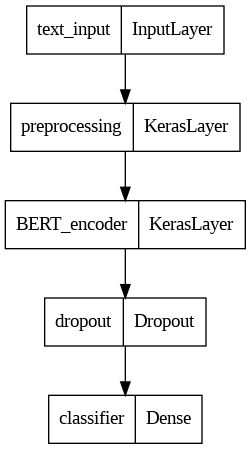
7. 畫出酷炫流程圖並存檔

tf.keras.utils.plot_model(model, 'model.png', show_shapes=False, rankdir='LR') # or 'TB'