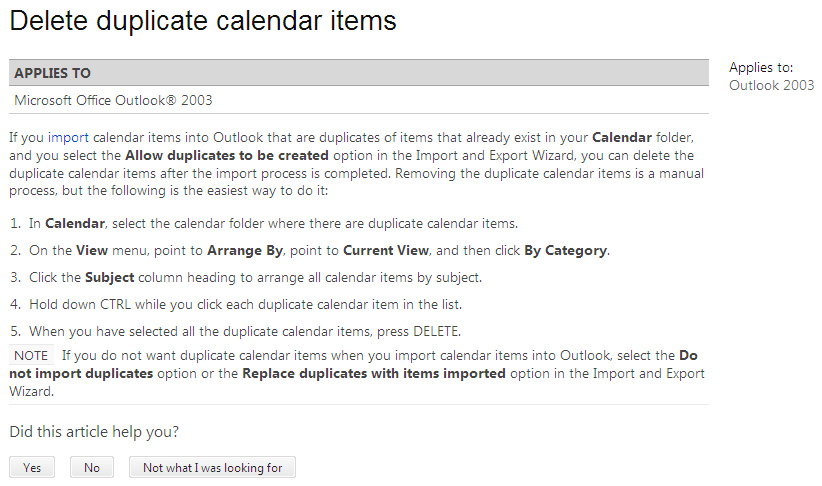
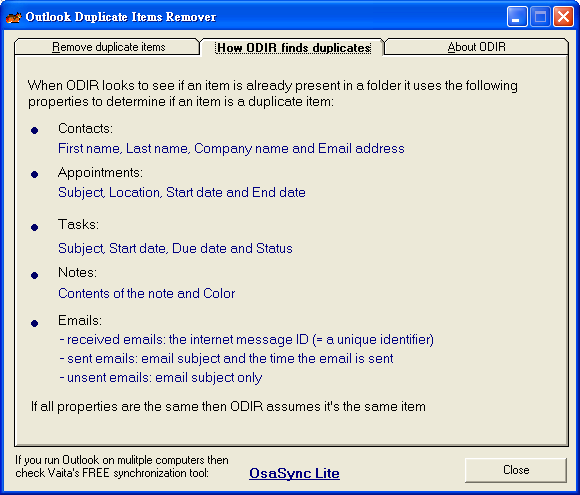
假如 outlook 每次都把以前備份的信件匯入, 那麼信箱裡就會塞滿很多重複的信件, 假如是使用 exchange 的話, 還會有很多重複的聯絡人, 會議等等, 相當地佔記憶體.
Windows 的用戶可以上網去抓一些免費的小工具, 但是 Mac 的用戶就比較辛苦了. 看來看去, Barry's Applecripts 不失為一個沒辦法中的選擇. 首先把有很多重複 mail 的 Outlook 信箱選起來 (select/select all), 然後在 AppleScript 編寫程式裡面選 "執行" 就可以了.
當然, 最好是先備份一下, 以免誤殺義士, 還要把紫微軟劍體拋入深谷~~
— Remove Duplicate Message v2.1
— An Applescript by Barry Wainwright, 15th October 2010
— Detects and deletes duplicate messages within a selected folder
— works on Message-ID header – uniquely identifying duplicates
— Version History
— v1.0 – 2002-03-18: First Release (For Microsoft Entourage)
— v2.0 – 2010-10-07: modified to work with Microsoft Outlook for Mac
— v2.1 – 2010-10-15: added final dialog to summarise messages removed
tell application "Microsoft Outlook"
set theMessages to current messages
if theMessages = {} then
try
set theFolder to selected folder
set mb to theFolder
on error
display dialog "In the folder listing, please select the folder you want to be scanned for duplicates" with icon stop buttons {"Quit"} default button 1
return -99
end try
else
set mb to folder of item 1 of theMessages
end if
set theName to name of mb
say "Removing duplicates from mail folder: " & theName
set y to count messages of mb
say "Number of messages to check, " & y
set IDlist to {}
repeat with x from y to 1 by -1
try
set theHeaders to (get headers of message x of mb)
set AppleScript's text item delimiters to {return & "Message-"}
set temp to text item 2 of theHeaders
set AppleScript's text item delimiters to {return}
set theId to text 5 through -1 of text item 1 of temp
on error
set theId to ""
end try
if theId is in my IDlist then
delete message x of mb
else if theId ≠ "" then
copy theId to end of IDlist
end if
if x mod 100 = 0 then say "" & x
end repeat
set removedCount to y – (count messages of mb)
if removedCount is 0 then
say "Finished. No duplicates detected"
else
say "Finished. " & removedCount & " duplicates removed"
end if
display dialog "" & y & " messages checked" & return & removedCount & " messages removed" buttons {"OK"} default button 1
set AppleScript's text item delimiters to {""}
end tell
對了!這個 script 是會說話的, 我本來還以為我幻聽了…原來是音量開得太小聲, 難怪一直聽到斷斷續續的人聲, 再猛一聽又沒了…. . 如果不想聽到聲音的話, 用 — 把 say mark 掉就行了.
2011/12/26 補充
太久沒用, 我都忘記 Apple Script 在哪裡了?首先進到 Finder 的工具程式, 再點選 Apple Script 編輯程式的 App. 把上面的 script 貼上去, 按執行就可以了!
如果 folder 太大, 確實有 time out 的危險. 按 command + option + shift + ESC 三秒鐘可以停掉當前 active 的程式.
2011/12/28 補充
因為這個 script 太慢了, 我想了一下. 畢竟相同的 mail 應該都是同一個時間, 主旨, 寄件人等等. 所以不論怎麼 sorting, 這些信都會連在一起. 所以不需要搜尋整個 IDList, 只要看到未見過的 theId 就把 IDList 清掉就好了. 我加了一行, 底色標成黃色.
if theId is in my IDlist then
delete message x of mb
else if theId ≠ "" then
set IDlist to {}
copy theId to end of IDlist
end if
要解決 time out 的問題, 把 tell 到 end tell 裡面用 time out 包起來就可以了. Time out 只能以秒為單位.
tell application "Microsoft Outlook"
with timeout of 1000000 seconds
…
end timeout
end tell
 Cash Chou's Blog