SSL 憑證到期小心得

我的免費SSL 憑證又到期了. 原本有個 SSL for free, 可以無限續杯. 但現在 SSL for free 已經併入 Zero SSL. 只能夠續杯 3 次, 每次 90 天. 而我的 3 次已經用完, 所以開始物色便宜憑證. 對我來說花點小錢比花時間還划算.

以下是我看過的網站:

發行單位 單價 平均每年價格
Zero SSL $8/Month 96 USD
Let’s encrypt 免費, 收捐款  
Namecheap $29.95/5 Year 5.99 USD
TWCA 2400 NTD/Year ~= 85 USD
中華電信 8000 TND/Year ~= 280 USD

然後, 很直覺地就會想在 Namecheap 買不是嗎?  結果刷卡之後, 就接到信用卡公司來電, 說這筆交易要繼續嗎? 這個網站經常回報盜刷, 要換卡嗎? 嗯…結果憑證沒買成, 還賠了一張信用卡. 前幾天新的信用卡來了, 我還沒背熟卡號故還沒用過, 讓自己綁手綁腳地, 真是自作虐.

我問銀行說這個網站部安全嗎? 銀行說不是. 但很多人回報後來被盜刷. 認真回想起來, 它在刷卡的時候不像 PCHOME 會顯示把資料加密. 所以這算是個弱點吧! 再說到它特別便宜是不是本來就有詐呢? 其實我選購的是最低級的憑證, 連公司名稱都看不到的等級 (positive SSL), 看得到公司名稱的是 Essential SSL, 最高級的是 premium SSL, 適用於電子商務 [3].

買便宜貨失敗後, 我只好動腦了. 真正免費的 certificate 憑證要怎麼拿到呢? 看起來在 certbot 的網站可以取得真正免費的資源 (https://certbot.eff.org/).

以我的網站為例, 在介面上選擇 apache over Windows 會跑到這裡:  https://certbot.eff.org/lets-encrypt/windows-apache, 只要按照網站的說明一步一步執行, 最後就會在 c:\certbot 目錄下看到 README 和這幾個檔案. 步驟要認真看, 其中 c:\certbot 要手動建立. SSH 並非必要, 當我就坐在主機前面的時候.

README 內容如下:

This directory contains your keys and certificates.

`privkey.pem` : the private key for your certificate.
`fullchain.pem`: the certificate file used in most server software.
`chain.pem` : used for OCSP stapling in Nginx >=1.3.7.
`cert.pem` : will break many server configurations, and should not be used
without reading further documentation (see link below).

WARNING: DO NOT MOVE OR RENAME THESE FILES!
Certbot expects these files to remain in this location in order
to function properly!

這四個檔案, 據我價值一張信用卡的理解, 對應到 WordPress 的名詞如下 [1][2].

# Server Certificate (ssl.crt/server.crt)SSLCertificateFile "cert.pem"# Server Private Key (ssl.key/server.key)
SSLCertificateKeyFile "privkey.pem"
# Certificate Authority (CA) (ssl.crt/ca-bundle.crt)SSLCertificateChainFile "fullchain.pem" or "chain.pem"

其中 [1] 沒有寫到 chain.pem, [1] 和 [2] 都沒有寫到 fullchain.pem. 根據 REAME, 用 fullchain.pem 可以適用於大部分 server, chain.pm 適用於 Ngnix (唸做 Engine X). 所以我用了fullchain.pem.

把 c:\certbot 的檔案 copy 到 Apache/conf 下, 修改  httpd-ssl.conf, 關掉 Apache server, 後再重開. 憑證就生效了. 但是看來每次 renew, certbot 只會放在 c:\certbot, 還要手動 copy 過去. 如果用 Windows 捷徑可不可以省去 copy 呢? 我晚點再研究. 因為今天很晚了~~~

2021/6/12: 驗證結果: 捷徑不行. conf 只能讀到實體檔案.

[REF]

  1. https://lightsail.aws.amazon.com/ls/docs/zh_tw/articles/amazon-lightsail-using-lets-encrypt-certificates-with-wordpress
  2. https://gist.github.com/harryfinn/e36e41cdbfba5a6e1d69d6498a4fc5ee
  3. https://comodosslstore.com/resources/what-is-a-premium-ssl-certificate/

V4L2 小整理

V4L2 全名 Video For Linux Version 2, 它是 Linux 裡面多媒體類的 kernel module [1]. 和它同等地位的包括 DTV, CEC 等其他 user space API. 比較複雜的系統也可能使用 Media Controller API 來維護 [5], 因為 V4L2 不提供查找 device 的能力, 但後者可以. 

V4L2 支援 16 種介面 (Interface), 在 [2] 裡面會各自稍微給一點介紹. 重點部分還是在它的 function [3] 和基本操作流程. 標準的 V4L2 使用流程, 包括下面 6 個步驟. 但執行順序可調換, 也可以省略其中幾步.

  • Opening the device
  • Changing device properties, selecting a video and audio input, video standard, picture brightness a. o.
  • Negotiating a data format
  • Negotiating an input/output method
  • The actual input/output loop
  • Closing the device

不可省略的像是基本安裝和打開關閉 device (open()/close()) 等等, 例如

mknod /dev/video0 c 81 0 // V4L2 的 major number 是 81.

某些 device 可以接受多次 open(), 表示各自得到使用的權利. 理論上每個 node 都可以支援所有的 function, 但這偏離現實. 我們可以使用 ioctl VIDIOC_QUERYCAP 這個 ioctl 去看一個 device 支援那些 function 和 IO method.

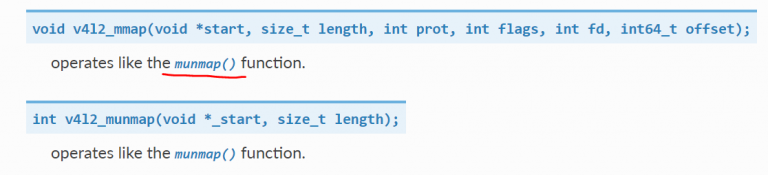
附帶一題, 最近不常看書, 所以很少找到印刷錯誤. 但我覺得 [6] 這裡打錯了, hyperlink 也錯. 畫紅線的地方應該是 mmap(), 要 link 到 [7] 才對.

在這數十個 function 之中, 最基本的就是: open(), close(), read(), write(), select(),poll(), mmap(), unmap(). 其他 97 個 VIDIOC_ 開頭的 request 都是代入 V4L2  ioctl() 使用. 

[REF]

  1. https://www.kernel.org/doc/html/v4.16/media/uapi/v4l/v4l2.html
  2. https://www.kernel.org/doc/html/v4.16/media/uapi/v4l/devices.html#devices
  3. https://www.kernel.org/doc/html/v4.16/media/uapi/v4l/user-func.html
  4. https://www.kernel.org/doc/html/v4.16/media/uapi/v4l/open.html
  5. https://www.kernel.org/doc/html/v4.16/media/uapi/mediactl/media-controller.html
  6. https://www.kernel.org/doc/html/v4.16/media/uapi/v4l/libv4l-introduction.html
  7. https://www.kernel.org/doc/html/v4.16/media/uapi/v4l/func-mmap.html

散熱小註解

最近公司的 IC 上了小板子有點燙, 還有技嘉的顯卡也燙, 因此對於搞清楚散熱的相關計算產生了好奇.

大家說技嘉顯卡的散熱墊片的熱傳導係數(heat transfer coefficient, K) 是 3Wm/k, 換成 12 Wm/k, VRM 和 GDDR6 的溫度就會下降. 換言之, 高導熱係數比較容易傳導熱量到正面的銅管和背面的鋁板上.

首先以顯卡來考量, 一張顯卡在 65% 功率限制下, 大概消耗 240 W. 火力全開假設是 370W (1 Watt = 1 J/s, J = 焦耳) .

Q=cm△t

W = Q/T = cm△t/T

所以一秒鐘內, 水冷想要降低顯卡 75 度 (100 –> 25), 考慮水的比熱 (容量) [1] = 4.2*103 焦耳每千克攝氏度, 水冷液 150 ml= 150 g = 0.15kg

240  = (4.2*10* 0.15 * 75) /t

t = 47250/240 =  196.875 (sec) ~= 3.3 min

所以水冷一開始會很有用, 但是過了三四分鐘水溫已經到極限, 就算冷排加風扇可以把 100 度往下降一點, 但溫差太小還是來不及散熱. 火力如果全開, t = 47250/370 = 127.7 秒 大概兩分鐘多就飽和了. 換言之水冷排不夠好, 就算水量多 3 倍也沒太大幫助. 真正能被持續帶走的熱量是水冷排貢獻的. 所以我好奇未來是不是該出現固態散熱線?

再來看散熱墊片, 散熱墊片的功能類似前面提到的水. 但為何賣散熱墊片的人不用比熱, 要用導熱係數 (W/ (m*k)) 為單位呢? 查著查著, 又看到一個相似的名詞熱導率/熱傳導率 (thermal conductivity), 因為單位一樣 [4], 看起來是兩岸翻譯不同.

根據 [2], “Thermal conductivity, also known as Lambda (denoted by the greek symbol λ)…It is measured in Watts per Metre Kelvin (W/mK)." 但這兩者應該有關係吧!? 果然老外也有人跟我有一樣的疑問 [3], 但是老中比較不好奇所以沒有討論.

有位 Elisan Magalhaes  說:

As the matter of fact, you can correlating both through the thermal diffusivity (熱擴散係數). The thermal diffusivity is defined as:
 α = k/(ρCp)
where:
α – the thermal diffusivity
k – the thermal conductivity
 ρ – density
Cp – the specific heat capacity at constant pressure
 
不過這樣還是只回答了一半, 也就是說熱擴散係數正比於導熱係數, 反比於比熱. 深一層的意義是, 比熱沒考慮到材料散熱面積, 只考慮總容量. 導熱係數有個變數是厚度. 故不能單獨決定散熱倒底好不好?  只有  α 比較能夠反映熱擴散的速度.
 
BTW, 網路上都寫α = k/ρCp, 但是按照單位來說, 應該是寫成 α = k/(ρCp) 比較不會混淆.
 
meter2/sec = (Watt / (meter * K)) / ((kg/meter3 )*(J/( kg · K))
 
12 (W/mK) = X Watt / (0.002m * 373.15 K) ==> X ~= 9W
 
所以導熱率 12 的散熱墊片, 如果有 2 mm 厚, 單面接觸 100 度攝氏度 (373.15 度 K) , 最多可以傳走  9W. 而導熱係數 3, 只譨帶走 9/4 = 2.25 W. 我理解為會多留下 6.75 W 在 PCB 上傳不走. 這部分還找不到網路上得實例, 繼續研究中.
 

[REF]

  1. 比熱容
  2. https://www.thegreenage.co.uk/article/thermal-conductivity-r-values-and-u-values-simplified/
  3. https://www.researchgate.net/post/Is_there_any_relation_between_the_heat_capacity_and_the_thermal_conductivity
  4. 熱導率

Tensorflow V2.0 相容性小實驗

為了一圓 AI 大夢, 我買了一塊 GTX 3090. 原本在 PCHOME 觀望三分鐘, 嫌貴沒按下去, 後來就再也買不到了!!!  電腦的東西不是應該慢慢降價嗎? “早買早享受, 晚買享折扣" 是大家都知道的定律啊!? 不過這次不一樣, 顯卡價錢還一天比一天高. 最後只好破釜沉舟買了蝦皮最後一張現貨, 而且是散熱貼片品質不好的技嘉. 

卡片到手之後, 先找個 BenchMark 來燒機, 結果老舊的 i7 扯了後腿, 分數還差正常的 3090 一成. 腦筋一賺, 來挖礦吧! 結果以前會動的 guiminer 程式都連不上礦池. 上網一查才知道電腦已經不能挖比特幣了. 不死心的我研究了一下, 得知可以在 Nicehash 挖別的幣換比特幣, 這樣果然就行了. 但是算力全開的話, VRM 瞬間就飆到 110 度. 嚇得死人了. 只敢開溫和模式當背景程式跑.

好了, 言歸正傳. 算 AI 會不會燒 VRM 要試了才知道.  然而, 客戶的事情如雪片般飛來, 我始終不能定下心跑程式. 兩個月過去, 比特幣都挖了 0.005 顆了, 但是正事還沒開工. 好不容易有清明連假, 趕快把電腦環境安裝起來. 有一篇文章跟我以前的軌跡很相似 [1], 於是我就按照這個思路來恢復環境.

不過 Google 排名靠前 – 很多人引用的文章相對都是比較舊的. 前述文章中的 Cuda 9 已經該進版到 Cuda 11.2, Cudnn 由 7.5 進版到 8.1.1, 其他流程都差不多. 按照文章一路破關, 然後在測試環境這邊卡住了. 當我執行 c = tf.matmul(a, b) 會得到:

" failed to create cublas handle: CUBLAS_STATUS_ALLOC_FAILED"

根據 [2] 所述, 這是分配記憶體的問題. 按照官網 [3] 要下tf.config.experimental.set_visible_devices.

但這個還是只能治標, 不能治本. 晚點還是會遇到

tensorflow.python.framework.errors_impl.InternalError: Blas xGEMM launch failed : a.shape=[1,2,3], b.shape=[1,3,2], m=2, n=2, k=3 [Op:MatMul]

看起來正確解答是這三行 [4]:

import tensorflow as tf
physical_devices = tf.config.list_physical_devices('GPU') 
tf.config.experimental.set_memory_growth(physical_devices[0], True)

但是要在 init 的時候下, 不能臨時抱佛腳. 所以要重來一次.

然後在 tensorflow 2.0, 過去的 tf.Session() 也被淘汰了, 要改用 f.compat.v1.Session(). tf.ConfigProto 也換成  tf.compat.v1.ConfigProto (待確認). 比較嚴重的區別是 tensorflow 2.0 預設開 eager execution. 會遇到

RuntimeError: The Session graph is empty. Add operations to the graph before calling run()

所以有三個方法:

A. 直接設定跟舊版相容 [7]:

import tensorflow.compat.v1 as tf
tf.disable_v2_behavior()

B. 或是關掉 eager execution [6]:

tf.compat.v1.disable_eager_execution()

C. 或者先宣告 session, 而不是等要用的時候才宣告. 例如 [6]:

 # Launch the graph in a session.
 with tf.compat.v1.Session() as ses:

     # Build a graph.
     a = tf.constant(5.0)
     b = tf.constant(6.0)
     c = a * b

     # Evaluate the tensor `c`.
     print(ses.run(c))

重來一次完整的步驟就是. 從 Anaconda 打開 Python 的 terminal.

import tensorflow as tf

physical_devices = tf.config.list_physical_devices('GPU') 
tf.config.experimental.set_memory_growth(physical_devices[0], True)
tf.compat.v1.disable_eager_execution()
a = tf.constant([1.0, 2.0, 3.0, 4.0, 5.0, 6.0], shape=[2, 3], name='a')
b = tf.constant([1.0, 2.0, 3.0, 4.0, 5.0, 6.0], shape=[3, 2], name='b')
c = tf.matmul(a, b)
sess = tf.compat.v1.Session(config=tf.compat.v1.ConfigProto(log_device_placement=True))
print(sess.run(c))


[REF]

  1. https://ithelp.ithome.com.tw/articles/10237846
  2. https://www.itread01.com/content/1545441880.html
  3. https://www.tensorflow.org/guide/gpu
  4. ://stackoverflow.com/questions/43990046/tensorflow-blas-gemm-launch-failed
  5. https://stackoverflow.com/questions/55142951/tensorflow-2-0-attributeerror-module-tensorflow-has-no-attribute-session
  6. https://github.com/OlafenwaMoses/ImageAI/issues/400
  7. https://github.com/tensorflow/tensorflow/issues/25446


AOP 小註解

此處 AOP 指 acoustics overload point, 是指麥克風可以收到的最大聲音. 大廠開的規格大約要求 AOP 在 120~130 分貝這個水準.

有人可能舉一反二, 問到最小聲可以量到多少有定義嗎? 這個值叫做 EIN (equivalent inout noise), 在 EIN 到 AOP 之間就是 dynamic range [1].

AOP_EIN-768x887

上圖可以看到 input 的分貝數 (dB) 後面寫了 SPL, output 又寫了 dBV, 這是什麼意思呢? SPL (sound pressure level) 顧名思義是聲壓的單位 [2]. 基準點是 P0.  

p0 = 20 μPa = × 10−5 Pa 

而這個 Pa 就是大氣壓力的巴 (Pa or Pascal), 一巴等於每平方米一牛頓[3], 大氣壓力是 101.325 kPa. 而基本聲壓 P0 只有 20 μPa, 可以想像這是一個很小的壓力.

SPL = Lp = 20 log10(P/P0)

這意思是說, 光是喊得很大聲沒用, 也要考量距離多遠. 比一個鞭炮在耳朵裡爆炸更大聲的是兩個鞭炮, 而不是遠處的雷聲. 現在統一用 dB SPL 來換算, 就可以得到公平的比較標準.

接著麥克風要把聲壓換成電壓來輸出, 我們才知道相對的大小聲. 這個輸出值就改用 dBV 來衡量 [4]. 這邊 V0 的基礎就是 1 伏特 (volt). 1 Volt 就是 0 dBV. 在一塊電路板上, 1 Volt 就是很大的值, 因此喊一聲的 dBV 都是負值.

例如圖中有一個 reference SPL = 94 dB SPL, 它換算的輸出電壓就是 -38 dBV. 這個輸出也稱之為 sensitivity. 根據 [1], The sensitivity of a microphone is the electrical response at its output to a given standard acoustic input.

Sensitivity 對應到 EIN 所對應的 dBV 中間的差異就是 SNR (signal to noise ratio).

[REF]

  1. https://www.invensense.com/wp-content/uploads/2015/02/AN-1112-v1.1.pdf
  2. http://www.sengpielaudio.com/TableOfSoundPressureLevels.htm
  3. https://zh.wikipedia.org/wiki/%E5%B8%95%E6%96%AF%E5%8D%A1
  4. http://www.sengpielaudio.com/calculator-db-volt.htm