清理 Outlook 裡面重複的信件

假如 outlook 每次都把以前備份的信件匯入, 那麼信箱裡就會塞滿很多重複的信件, 假如是使用 exchange 的話, 還會有很多重複的聯絡人, 會議等等, 相當地佔記憶體.

Windows 的用戶可以上網去抓一些免費的小工具, 但是 Mac 的用戶就比較辛苦了. 看來看去, Barry's Applecripts 不失為一個沒辦法中的選擇. 首先把有很多重複 mail 的 Outlook 信箱選起來 (select/select all), 然後在 AppleScript 編寫程式裡面選 "執行" 就可以了. 

當然, 最好是先備份一下, 以免誤殺義士, 還要把紫微拋入深谷~~

— Remove Duplicate Message v2.1

— An Applescript by Barry Wainwright, 15th October 2010

— Detects and deletes duplicate messages within a selected folder

— works on Message-ID header – uniquely identifying duplicates


— Version History

— v1.0 – 2002-03-18: First Release (For Microsoft Entourage)

— v2.0 – 2010-10-07: modified to work with Microsoft Outlook for Mac

— v2.1 – 2010-10-15: added final dialog to summarise messages removed


tell application "Microsoft Outlook"

set theMessages to current messages

if theMessages = {} then

try

set theFolder to selected folder

set mb to theFolder

on error

display dialog "In the folder listing, please select the folder you want to be scanned for duplicates" with icon stop buttons {"Quit"} default button 1

return -99

end try

else

set mb to folder of item 1 of theMessages

end if

set theName to name of mb

say "Removing duplicates from mail folder: " & theName

set y to count messages of mb

say "Number of messages to check, " & y

set IDlist to {}

repeat with x from y to 1 by -1

try

set theHeaders to (get headers of message x of mb)

set AppleScript's text item delimiters to {return & "Message-"}

set temp to text item 2 of theHeaders

set AppleScript's text item delimiters to {return}

set theId to text 5 through -1 of text item 1 of temp

on error

set theId to ""

end try

if theId is in my IDlist then

delete message x of mb

else if theId ≠ "" then

copy theId to end of IDlist

end if

if x mod 100 = 0 then say "" & x

end repeat

set removedCount to y – (count messages of mb)

if removedCount is 0 then

say "Finished. No duplicates detected"

else

say "Finished. " & removedCount & " duplicates removed"

end if

display dialog "" & y & " messages checked" & return & removedCount & " messages removed" buttons {"OK"} default button 1

set AppleScript's text item delimiters to {""}

end tell


對了!這個 script 是會說話的, 我本來還以為我幻聽了…原來是音量開得太小聲, 難怪一直聽到斷斷續續的人聲, 再猛一聽又沒了….:/. 如果不想聽到聲音的話, 用 — 把 say mark 掉就行了.
 
2011/12/26 補充

太久沒用, 我都忘記 Apple Script 在哪裡了?首先進到 Finder 的工具程式, 再點選 Apple Script 編輯程式的 App. 把上面的 script 貼上去, 按執行就可以了!
 
如果 folder 太大, 確實有 time out 的危險. 按 command + option + shift + ESC 三秒鐘可以停掉當前 active 的程式.
 
2011/12/28 補充
 
因為這個 script 太慢了, 我想了一下. 畢竟相同的 mail 應該都是同一個時間, 主旨, 寄件人等等. 所以不論怎麼 sorting, 這些信都會連在一起. 所以不需要搜尋整個 IDList, 只要看到未見過的 theId 就把 IDList 清掉就好了. 我加了一行, 底色標成黃色.
 

if theId is in my IDlist then

delete message x of mb

else if theId ≠ "" then

set IDlist to {}

copy theId to end of IDlist

end if


要解決 time out 的問題, 把 tell 到 end tell 裡面用 time out 包起來就可以了. Time out  只能以秒為單位.

tell application "Microsoft Outlook"

with timeout of 1000000 seconds
end timeout
end tell

ID3 的語系設定

客戶又抱怨為啥我們的 ID3 顯示經常是亂碼, 競爭者每次都對, 一定不是運氣的關係… 於是我只好又求助 Google 大神了. 果然, ID3 的規格是這樣寫的, 無論有幾個 frame, 每個 frame 都由 frame ID, frame size 和 flag 共 10 個 bytes 開頭, 後續至少有 1 byte 的 content. 如果 frame ID = TLAN, 就表示 ID3 的語系寫在後面的 3 個 bytes 裡面. [1]

這三個 bytes 採用  ISO 3166-1 alpha-3 的定義 [2], 包括簡體 (CHN), 繁體 (TWN) 都有. 據說本來這個定義是用在護照上面, 機器讀到這個代號, 就知道這是哪個國家. 

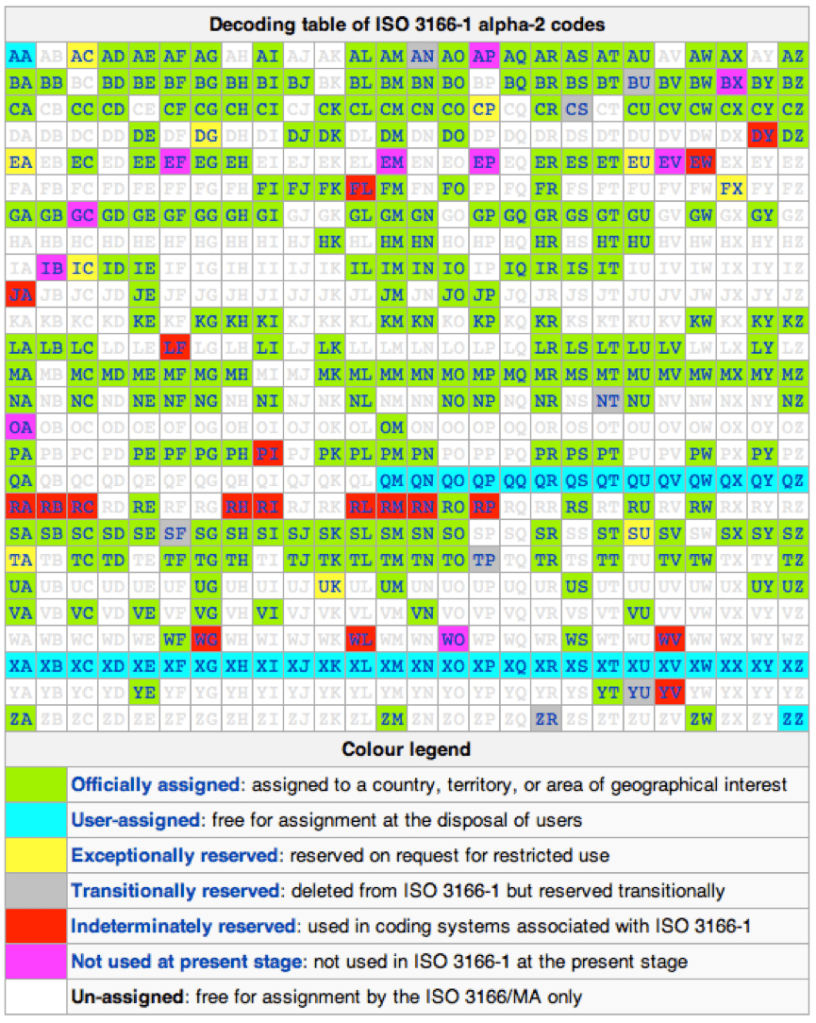
那麼, 既有 alpha-3, 也會有 alpha-2 嗎?有! 此時中國是 CN, 台灣就是  TW, 美國就是 US [3]. 1但是兩個字母的組合太少, 辨識上比較困難. 南韓叫做 KR, 北韓叫做 KP, 就是沒人認領 KO (knock out)…

[REF]

1.  http://www.id3.org/id3v2.3.0#ISO-639-2

2. http://en.wikipedia.org/wiki/ISO_3166-1_alpha-3

3.  http://en.wikipedia.org/wiki/ISO_3166-1_alpha-2

真假 QuickTime

我們的客戶一直強調不可以播 Quick Time 格式. 但是什麼是 Quick Time 格式呢? 我 Google 了一下, 但是 keyword 不對, 怎麼也抓不到重點. 像是 "wiki quicktime" 這些都沒用. 唯一有用的 keyword 是 "quicktime spec.", 只有願意看規格的人才找得到答案. :D

 Apple 認為 Quick Time 格式是 MPEG4 的基礎, 雖然 quick time 和 MPEG4 長得很像, 但是 Quick Time 是 Apple 的智慧財產權, 和 MPEG4 不能混為一談!如果因為長得很像, 就當做同一個東西的話, Apple 豈不是要和 MPEG-LA  分權利金了嗎?當然不行囉!

Important:  The QuickTime File Format has been used as the basis of the MPEG-4 standard and the JPEG-2000 standard, developed by the International Organization for Standardization (ISO). While these file types have similar structures and contain many functionally identical elements, they are distinct file types.

QuickTime file format 由一個個的 atom 組成, 每個 atom 都和 MPEG-4 的 box 差不多. 再強調一次, 只是看起來很像…

Note: An atom, as described in this document, is functionally identical to a box, as described in the ISO specifications for MPEG-4 and JPEG-2000. An atom that includes version and flags fields is functionally identical to a full box as defined in those specifications.

對於一個典型的 MOV 檔, 它就是以 movie atom, movie data atom 所構成的 quick time file. 這個 movie atom 後面會跟著 4 bytes 的 atome size, 接著就是 4 個 byte 的 atom type. 當 atom type = ftyp, 那麼它可能就是一個 MPEG-4 或是 JPEG2000.

緊接在 ftyp 後面就是這個 atom 的 data, data 的開頭則可能是 major band.

Major_Brand

A 32-bit unsigned integer that should be set to 'qt  ' for QuickTime movie files. If a file is compatible with multiple brands, all such brands are listed in the Compatible_Brands fields, and the Major_Brand identifies the preferred brand or best use.

 所以 ftypqt 連在一起, 就是 quick time 的 MPEG04. 除了 major band 還有 compatible band, 它包含了 major band.

Compatible_Brands

A series of unsigned 32-bit integers listing compatible file formats. The major brand must appear in the list of compatible brands. One or more “placeholder” entries with value zero are permitted; such entries should be ignored.

如果 compatible band 沒有一個是 qt, 那麼這個 file 就不是 Quicktime movie. 因此, 判斷方式很明顯了. 就算附檔名看起來一樣, 檔案結構很相似, 但是有個明顯的標記區分著 QuickTime 和一般 MPEG4 或 MOV, 賴也賴不掉~~~

Note: A common source of this error is an MPEG-4 file incorrectly named with the .mov file extension or with the MIME type incorrectly set to “video/quicktime”. MPEG-4 files are automatically imported by QuickTime only when they are correctly identified as MPEG-4 files using the Mac OS file type, file extension, or MIME type.

[ref] 

在 Mac 底下用 UART debug

MBP 又出新款, 感覺我的這台又貶值了許多. 總之, 今天的主題是, 怎樣在 MacBook 下透過 UART debug.

首先我們要買一條 USB 轉 RS232 的線, 它不算貴 (360 NTD), 所以還要多買幾樣東西才能達到 PCHOME 的免運費標準. 我買的這條是 Atake 的, driver 在這裡抓:rs232-newdriver-091031.zip.

接下來安裝 Mac OS 10 的 driver, 重新開機後, 上面會出現一個像是電話的 icon.

點選這個 icon, 會進入網路選項. 接著進入右下角的 “進階…". 莫驚慌, “進階" 裡面沒啥東西. 此時要選擇的 modem 是 null modem, 速率看狀況. 但撥號前等撥號音, 可以避免它亂撥號, 否則會收不到 QA board 傳回的 print, 也就是所謂的打印信息.

此外, 就是要記得把終端機打開, 終端機命令取消.

當然, 這有點投機取巧. 對 MBP 來說, 我開了視窗卻沒撥號, 只是一個暫態. 因此相關的視窗是以 “連線中" 的方式佔據了前景, 只能放大還不能縮小. 不過, 在沒有更高科技的解法之前, 大家也可以像我一樣湊合著用.

3GP 和 3G2 的音視頻格式差異

3GP 和 3G2 是手機上的錄影格式, 也用在 MMS (Multimedia Message Service), IMS (IP Multimedia Subsystem), MBMS (Multimedia Broadcast  / Multicast Service) 和 PSS (Personal Public Service) 的影音服務上. 他們主要的差異是用在不同的電話系統, 一個用在 GSM, 另一個用在 CDMA.

Video 的部份看起來是互通的, 但是 audio 看起來差很大.

分類
異同
3GP (for GSM) 3G2 (for CDMA)
video 共同 MPEG4, H263, H264
不同 ? ?
audio 共同 AMR-NB,AMR-WB,LC-AAC,HE-AAC V1
不同 AWR-WB+, HE-AAC V2

EVRC,EVRC-B,EVRC-WB,

13K (QCELP), SMV,VMR-WB