HTTPS 小註解

看臉書上說, 現在大部分的網站都用 HTTPS 了. 雖然說臉書假新聞多, 那我這個站呢? 我把我改 HTTPS 的心得跟大家也分享一下.

首先, XAMPP 就可以自行產生 key, 變成 HTTPS 的網站 [1]. Keyword 就是 makecert.bat 打下去就對了! 在交互式的輸入中, 除了 Common Name 要打 IP 或是 domain name 之外, 沒有什麼難的. 做完之後, 它自動會把三把 key 放到 apache/conf/ 下面的三個目錄:

ssl.csr 裡面放 server.csr
ssl.crt 裡面放 server.crt
ssl.key 裡面放 server.key

這樣第一階段就完成了. 第二步要確定 apache/conf/ 下的 httpd.conf 裡面, 

LoadModule rewrite_module modules/mod_rewrite.so

這行的註解 (‘#’) 被拿掉後, 用 https://www.cash.idv.tw 就可以連上我的網站了. 當然, 後面還有一些細節是要保護那些目錄? 這個我先略過不提. 我要講的重點是, 如果用 chrome browser  去連 https://www.cash.idv.tw, 它竟然把我的 https 用斜線劃掉了, 這樣看起來好丟臉啊! 

not-https

查了前人的文章 [2], 才知道 Chrome 會檢查憑證是否為第三方所認證的. 我們自己產生出來的 key, 當然不能說很有說服力, 有人證認確實比較好. 怎麼辦呢? 找到一個 SSL for free 可以解決這個問題 [3], 只要按照網站上說的, 產生 SSL key 應該不困難.

在這個過程中, 我發現我在 PCHOME 代管的 DNS, 只有註冊 http://www.cash.div.tw, 沒註冊 cash.idv.tw.  把這個問題修正了之後, 才能夠通過 SSL fro free 的測試. 如果一切順利, SSL for free 網站會生出三個檔案, 打包成一個 sslforfree.zip 下載.

這個 zip 檔解開之後, 會看到 ca_bundle.crt, certificate.crt, private.key 三個檔案. 看起來只要能用這三個檔案代替 XAMPP 的三個檔案, 那麼 Chrome browser 也不能再挑剔我的 key 沒有公信力了吧!

話雖如此. 那個對到哪個呢? 這訊息我 Google 不到, 畢竟用 SSL for free 的人和用 XAMPP 的人交集很少吧!? 那就只好自己來了. 雖然我好想靠別人哪~~~

根據 /apache/conf/extra/httpd-ssl.conf 裡面寫的, private.key 顯然就是 server.key

# Server Private Key:
# If the key is not combined with the certificate, use this
# directive to point at the key file. Keep in mind that if
# you’ve both a RSA and a DSA private key you can configure
# both in parallel (to also allow the use of DSA ciphers, etc.)
# ECC keys, when in use, can also be configured in parallel
SSLCertificateKeyFile “conf/ssl.key/server.key"

CA 是第三方認證的. 顯然是 ca_bundle.crt 那包, 要放到 ssl.crt, 我把 ca_bundle.crt 直接 rename 成 ssl.crt 下的 server.crt. 不 rename 改 config 檔也可以通.

# Certificate Authority (CA):
# Set the CA certificate verification path where to find CA
# certificates for client authentication or alternatively one
# huge file containing all of them (file must be PEM encoded)
# Note: Inside SSLCACertificatePath you need hash symlinks
# to point to the certificate files. Use the provided
# Makefile to update the hash symlinks after changes.
#SSLCACertificatePath “c:/Apache24/conf/ssl.crt/"
#SSLCACertificateFile “c:/Apache24/conf/ssl.crt/ca-bundle.crt"

最後是 certificate.crt, 難不成它就是  ssl.csr 下的 server.csr? 看起來也的確有對上.

# Server Certificate:
# Point SSLCertificateFile “conf/ssl.crt/server.crt"
# the certificate is encrypted, then you will be prompted for a
# pass phrase. Note that a kill -HUP will prompt again. Keep
# in mind that if you have both an RSA and a DSA certificate you
# can configure both in parallel (to also allow the use of DSA
# ciphers, etc.)
# Some ECC cipher suites (http://www.ietf.org/rfc/rfc4492.txt)
# require an ECC certificate which can also be configured in
# parallel.
SSLCertificateFile “conf/ssl.crt/server.crt"

把這三個檔案各自 rename 之後, Chrome 也就不抱怨我的 https 了. 測試了一下 http 和 https 都可以連上我的網站. 按照網路上的說法, 應該要把 http 的網址關掉, 然後只用 https 的網址. 或者把 http 的 request 都 redirect 到 https. 不過, 只要我打開 SSLRequireSSL, XAMPP 就開不起來了. 這個我還在研究中. 總之, 我把 Chrome 的紅字先劃掉了!

SSL for Free apache 目錄 重新命名
ca_bundle.crt ssl.crt server.crt
certificate.crt ssl.csr server.csr
private.key ssl.key server.key

2017/2/26 補充

如果要在後台強制使用 https, 參考 [4] 這篇, 在 wp-config.php 當中, 在 下面這段出現之前 (它通常在最後一行).

/** 設定 WordPress 變數和包含的檔案。 */
require_once(ABSPATH . ‘wp-settings.php’);

加入下面的 define. 因為有版本新舊的關係. 可以兩個都加.

define(‘FORCE_SSL_ADMIN’, true); /* 新版適用 */
define(‘FORCE_SSL_LOGIN’, true); /* WordPress version 4 以後就不用了 */

[REF]
  1. http://robsnotebook.com/xampp-ssl-encrypt-passwords
  2. HTTPS網站被Chrome打臉?
  3. SSL For Free 免費 SSL 憑證申請,使用 Let’s Encrypt 最簡單方法教學!
  4. Administration Over SSL

Philips HDR 白皮書小註解

根據 WIKI 的記載, HDMI 2.1 的規格來自於 Philips HDR 白皮書 [1]. 雖然這句話簡直不能說是中文: “HDMI 2.0A涵蓋HDR EOTF信令和靜態後設資料後設資料的動態是HDMI 2.1所涵蓋。" 那麼, 我們來看一下白皮書吧!

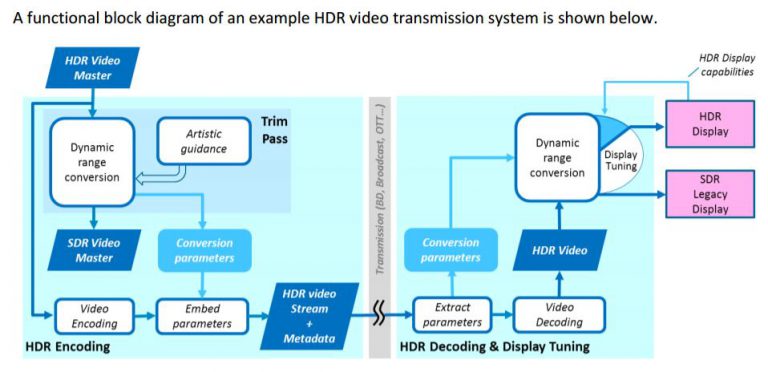
白皮書認為: 電視或影片大致分為 HDR 和 SDR 兩大類. 我們只需要壓出一種品質的片子, 然後帶一些參數, 就可以在 HDR 或 SDR 的電視上播放!  (白皮書的圖如下)

Philips-White-Paper-768x372

如果一開始就製作出 HDR 品質的片子, 那麼以 HDR 播出一定不會是問題. 至於怎麼產生出 SDR 的版本, 白皮書說這是 colorist 或 artist 要做的工作. 他們根據 frame 或是 scene 的場景轉換, 分別調整出對應的 content-dependent 的 tone mapping 參數. 然後把調好的參數, 根據定價 120 USD 的 SMPTE standard ST 2094-20 [2], 放進 video bit stream 的 SEI ( supplemental enhancement information) [3].  

class SEIToneMappingInfo : public SEI
{
Public:
 PayloadType payloadType() const { return TONE_MAPPING_INFO; }
 SEIToneMappingInfo() {}
 virtual ~SEIToneMappingInfo() {}
 Int m_toneMapId;
 Bool m_toneMapCancelFlag;
 Bool m_toneMapPersistenceFlag;
 Int m_codedDataBitDepth;
 Int m_targetBitDepth;
 Int m_modelId;
 Int m_minValue;
 Int m_maxValue;
 Int m_sigmoidMidpoint;
 Int m_sigmoidWidth;
 std::vector<Int> m_startOfCodedInterval;
 Int m_numPivots;
 std::vector<Int> m_codedPivotValue;
 std::vector<Int> m_targetPivotValue;
 Int m_cameraIsoSpeedIdc;
 Int m_cameraIsoSpeedValue;
 Int m_exposureIndexIdc;
 Int m_exposureIndexValue;
 Bool m_exposureCompensationValueSignFlag;
 Int m_exposureCompensationValueNumerator;
 Int m_exposureCompensationValueDenomIdc;
 Int m_refScreenLuminanceWhite;
 Int m_extendedRangeWhiteLevel;
 Int m_nominalBlackLevelLumaCodeValue;
 Int m_nominalWhiteLevelLumaCodeValue;
 Int m_extendedWhiteLevelLumaCodeValue;
};

至於調整參數時用的電視的 st 2086 規範中的參數, 當然也要放進去. ( The characteristics of the display used for grading or monitoring, such as peak luminance and black level, are added as SMPTE ST 2086 metadata to the video stream. )

另外一個變形是, 傳出 SDR 的 video bit stream, 並且帶上一些參數, decoder 端原則可以解出 SDR 版本, 並且透過計算產生 inverse dynamic range conversion 的 HDR 版本. 這些轉換原理不管壓成  SDR 或是 HDR bit stream 時都是一樣的. 但是為了確保在 decoder 端 (通常是 OTT 或是 STB) 可以把 SDR 再還原出 HDR, 在 encoder 端做 HDR 轉 SDR 的時候, 不能夠用到硬砍的方式 (hard clipping is not allowed).

上述的討論只限於 decoder 和 encoder 之間, 還沒有考慮到 HDMI. 畢竟 HDMI 只傳 raw data, 可想而知那些相關的係數都要透過額外的 HDMI 封包來傳. 在 HDMI 2.0 的時代, 我們通常是傳靜態的 ST 2086 metadata. 至ˊ於動態的部分, 目前 HDMI 的網站 [4] 還沒看到 2.1 的規格, 只看到 2.0b 而已.

[REF]

  1. http://www.flatpanelshd.com/downloads/philips_hdr_white_paper.pdf
  2. http://www.techstreet.com/standards/smpte-st-2094-20-2016?product_id=1922111
  3. https://hevc.hhi.fraunhofer.de/HM-doc/_s_e_i_8h_source.html
  4. http://www.hdmi.org/manufacturer/

foreign-architecture 小註解

今天想要用 apt-get, 結果冒出 Unable to locate package git-fame

cashchou@server: ~ $ sudo apt-get install git-fame
Reading package lists… Done
Building dependency tree
Reading state information… Done
E: Unable to locate package git-fame

為了消除  Unable to locate package, 據說要清理 source list, 很多人是因為網路的關係連不上 ubuntu, 但我確定都連得上, 所以不用改 source list. 而是可以試著 update. 結果在 apt-get update 的時候, 看到一堆類似的 warning. 像是:

W: Failed to fetch http://tw.archive.ubuntu.com/ubuntu/dists/precise-updates/InRelease Unable to find expected entry ‘ main/binary-foreign-architecture/Packages’ in Release file (Wrong sources.list entry or malformed file)

之類的東西. 話說 main 和 Packages 中間應該是出現 architecture 沒錯, 但應該是 amd64, i386 這種 architecture, 而不是直接來個 foreign architecture 吧! 

cashchou@server: /etc/apt $ dpkg –print-architecture
amd64
cashchou@server: /etc/apt $ dpkg –print-foreign-architectures
foreign-architecture

這表示我們 server 的架構是 amd64, 如果曾不小心打成 and64, 或是 i586 打成 1586…這些都會被認為是不相容的外國建築 (foreign-architectures) . 但…這 server 上的外國建築竟然就叫做外國建築吶! 我試著把它刪除, 結果…得到一句繞口令…不能移除不是外國建築的外國建築.

cashchou@server: /etc/apt $ dpkg –remove-architecture foreign-architectures
dpkg: warning: cannot remove non-foreign architecture ‘foreign-architectures’

原來是我忘了 sudo, 加 sudo 硬是把它幹掉之後, apt-get update 就正常了.

sudo dpkg –remove-architecture foreign-architecture

但還是不能 upgrade.

cashchou@server: /etc/apt $ sudo apt-get upgrade
Reading package lists… Done
Building dependency tree
Reading state information… Done
You might want to run ‘apt-get -f install’ to correct these.
The following packages have unmet dependencies: …一大堆錯誤

據說, 此時可以試著 apt-get -f install, 但我試過這招沒用. 因為 unmet 太多了.

…一大堆錯誤
E: Unmet dependencies. Try using -f.

啊 force 也沒用啊!! 根據網路資訊 [1], 接下來的 SOP 就是先自動修復, 依序執行下面幾步. 當然 // 後面不是指令, 只是註解.

sudo apt-get update      // update your package list
sudo apt-get autoclean   // clean up any partial packages
sudo apt-get clean       // clean up the apt cache
sudo apt-get autoremove  // will clean up any unneeded dependencies.

還不行的話, 只好逐個修復. 

sudo dpkg --remove -force --force-remove-reinstreq package name

弟兄們裝了太多 package, 彼此互相影響, 我沒時間一個一個重裝, 只好留待比較急的人有緣人來處理了~~~

[REF]

  1. http://www.linuxquestions.org/questions/linux-general-1/resolve-generated-breaks-held-packages-896449/

NSAID 小註解

如果直接 Google “NSAID", 將會得到一大串 nonsteroidal anti-inflammatory drug (非類固醇抗發炎藥物) [1] 的搜尋結果, 不過我想要整理的是 Non-Secure Access ID.

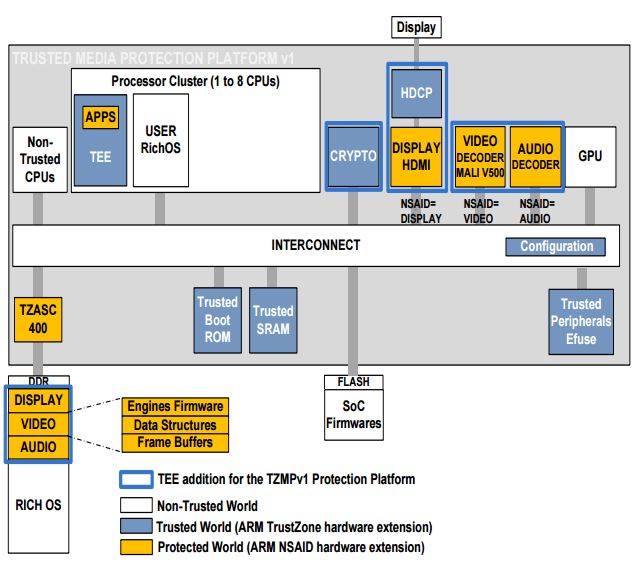
根據 [2], 在 ARM 的 trusted media protection platform 當中, 有個 TZASC (Trusted Zone Address Space Controller) 400 把 SOC 的本體和 DDR 隔開來, DDR memory controller (DMC) 接在它和 DDR memory 之間. 因此, 那些 IP 可以存取哪一塊記憶體就會受到管制.

TEEnNSAID

至於圖中那些不同顏色的 IP, 代表處在不同等級的保護. 在 TEE 的字典裡, 最不安全的是 rich domain 例如 APP 們; 再來是 protected domain, 例如 virtual machine. 比較安全的是 trusted domain, 像是 TEE 的 TA (trusted Application); 最安全的是 secure domain, 例如獨立的硬體. 

那些黃色的 IP, 屬於 protected world. 例如 audio, video, HDMI (稱為 master) 有時候可能不需要嚴格保護, 所以他們有個 non-secure 的 access ID, 告訴 TZC 說我要合法存取我自己的那塊記憶體. 至於不合法的存取, 在 TZC 會被過濾掉 – 針對 ID 過濾, 或是只能讀或寫.

另外, 圖中的 GPU 是白色, 這只是舉例. GPU 也可以支援 protected world. ARM 有部分 GPU 可以從外部電路將它切到 protect mode, 另外有一些新型號 GPU 的 protect mode 是內建的.

[REF]

  1. 非類固醇消炎止痛藥- 維基百科,自由的百科全書 – Wikipedia
  2. http://www.iaik.tugraz.at/content/about_iaik/events/ETISS_INTRUST_2013/ETISS/slides/GPTEE_Public.pdf

Far Field Pickup 硬體小整理

此處的 FFP (Far Field Pickup) 專指一段距離以外的人聲的輸入, 通常 5 米之外可以算是 “far". 遠處的ˊ聲音除了變小聲之外, 還會有雜音和回音 (reverberation – 有反射, 反響, 混響…等翻譯) 的問題. 

雜音可能來自平常容易被忽略掉的冷氣機, 隔壁座位的鍵盤敲擊聲或是遠處其他人的交談, 因為主要聲音來源 (人聲) 變小聲了, 這些背景聲就相對成了嚴重干擾. 回音的來源主要則是是牆壁和家具的反射. 如果有影音設備正在播放語者的輸入, 例如用電視打 Skype 時, 回授的聲音 (人聲經由: 麥克風 -> 喇叭 -> 麥克風) 可能變得比發話的聲音更大.

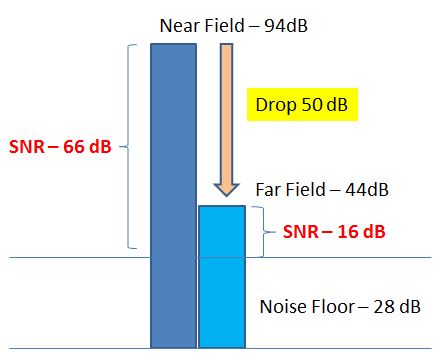
既然有這麼多干擾存在, 第一步當然是選個好的硬體來收音. 在正常環境下, 近距離對著一個好的麥克風講話, 此時的聲壓 (SPL- Sound pressure level) 可以高達 95 dB. 但是到了 far field, SPL 就會下降約 50 dB, 只剩 44 dB [1]. 44 dB 扣掉噪音28 dB, 還剩下 16 dB SNR 可以做語音輸入. 

FF-Microphone

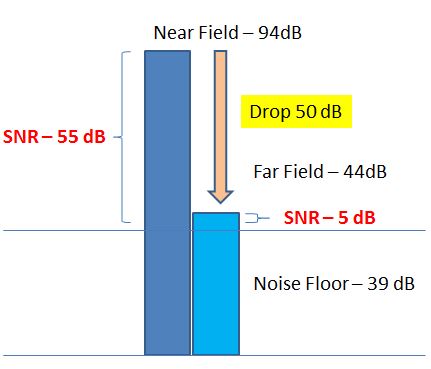
如果換一支原本就只有 55 dB SNR 的麥克風來做 far field pickup 的話, 遠端的音量再扣掉 50 SPL, SNR 就只剩下 ˋˋ44 (S) – 39 (N) = 5 (dB). 這樣要拿來做語音輸入就沒辦法了. 

badFFMicrophone

想到高 SNR, 大家直覺會想到用更高 bit 數的 ADC. 古書有云, SNR = 20log10(2bit). 以 18 bit ADC 為例, 按照公式, 理論 SNR 應該有 20log10(218) = 108 dB. 但考慮到 ADC 的 internal noise, 在 ref [1] 裡面只當它是 96 dB dynamic range (DR). 

根據 ref [2]:

DR = 20 log10(FS/rms noise

18 bit 只是 full scale (FS), 必須考量到實際電路不能理想地反映數學, 以致產生了一定程度的 noise (以 root mean square 計算). 在 ref [3] 裡面提到, 一個 input-referred noise 隨便就可以掉 2.7 bit, 而量化誤差頂多是影響半個 bit 而已.

以 AD7985 這顆 ADC [4] 為例,  它有 16 bit, 數學算出 SNR 是 96 dB, 但實際 SNR (@ 20KHz – 與頻率響應有關) 是 88.5 dB , dynamic range (不特定頻率) 是 89 dB. 因此這三個值的ˋ意義是不同的, 在 far field pickup 的考量中, dynamic range 相對比較重要, 因此 ref [1] 裡面提到的 dB 是指 dynamic range.

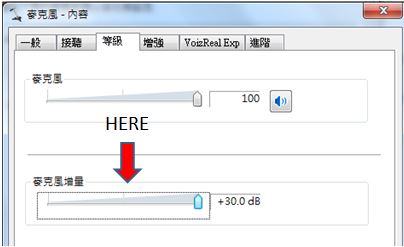
當我們的 ADC 有已知的 dynamic range, 那麼還有沒有辦法把再提升呢? 例如能放大一點嗎? 其實這就是 boost 的概念. 在 Windows 作業系統裡面就有 microphone boost, 可以從最小聲的 0dB, 調到最大聲的 +30dB. 

microphoneBoost

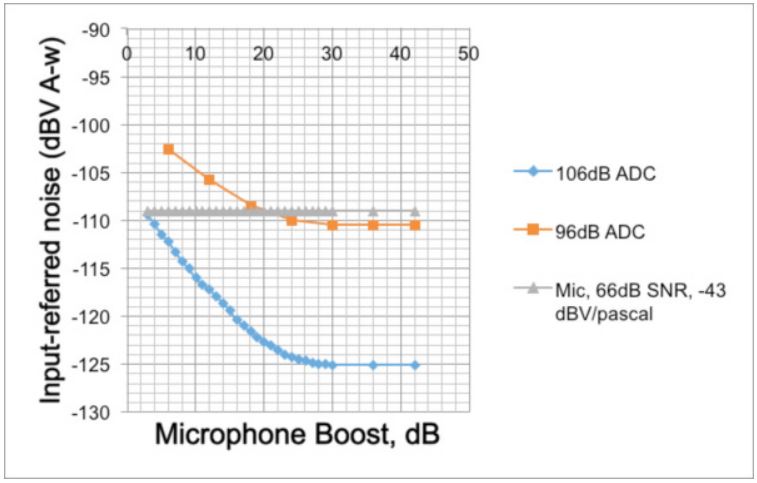
然而 “調大聲一點" 也會把噪音調大, 倒是對於抑制內部的噪音有一定效果. 看一下 ref [1] 的這張圖. 圖中的 106 dB 和 96 dB 都是指 dynamic range. 我們可以看到: boost 到一定的程度後, input referred noise 也不會再降低了. 而整個麥克風輸入的 noise floor 是麥克風和 ADC (藍色或是橘色) noise 的加總.

NoiseFloorwithADC

對 106 dB ADC 來說, boost 到 30 dB 才飽和, 而 96 dB ADC boost 到 24 dB 後也就沒有什麼效果了. 另一方面, 不管 boost 多少, 106 dB ADC 的噪音總會比 96 dB ADC 來得小.

實際上, 我們不會把 microphone boost 到極限. 原因在於人聲從 5 公尺外傳過來後, 可能只剩 44~75 dB, 而裝置上的喇叭卻可能直接以 95 dB 灌進麥克風 (例如 Amazon 的 Echo, Google 的 Home 的機構). 所以我們會選擇 SNR 更好的麥克風, dynamic range 更大的 ADC, 並搭配剛剛好的 boost, 以避免破音 – 天花板不變的狀況下, boost 愈多, ADC 的 saturation point (破音點) 愈低.

上述的硬體選擇固然可以降低噪音的干擾, 但是要進一步消除動態 (non-stationary) 的噪音, 還需要 acoustic echo canceling 和  beamforming. 這兩個部分都牽涉很多軟體的演算法. 在這篇短文中就跳過不提了.

[REF]

  1. http://www.edn.com/Pdf/ViewPdf?contentItemId=4438627
  2. http://www.analog.com/en/analog-dialogue/articles/oversampled-adc-pga-dynamic-range.html
  3. http://www.analog.com/en/analog-dialogue/articles/adc-input-noise.html
  4. http://www.analog.com/media/en/technical-documentation/data-sheets/AD7985.pdf