Westeros 小註解

關於這個題目, 可以依據過去的歷史, 看出發展的軌跡.

    1. STB/OTT box 需要一個 browser.
    2. 過去常用的 qtwebkit 已經不 maintain 了. 下一代是 Blink 或是 Webkitgtk+.
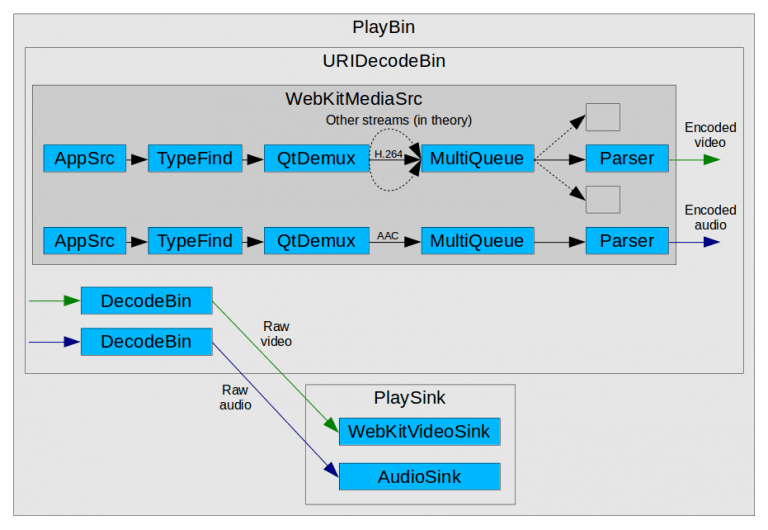
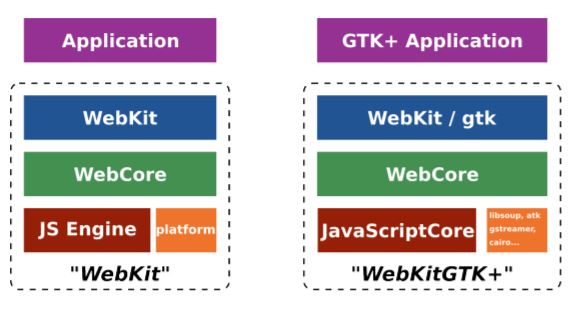
    3. 將 Wbkitgtk+ 中的gtk+ 拔掉, X server 換成 Wayland, 就得到 Wayland for Webkit. 架構圖如下 [from igalia]:webkitgtkJPG
    4. X server 哪裏不好?因為它不是 client-server 的架構, 所以彈性較差.
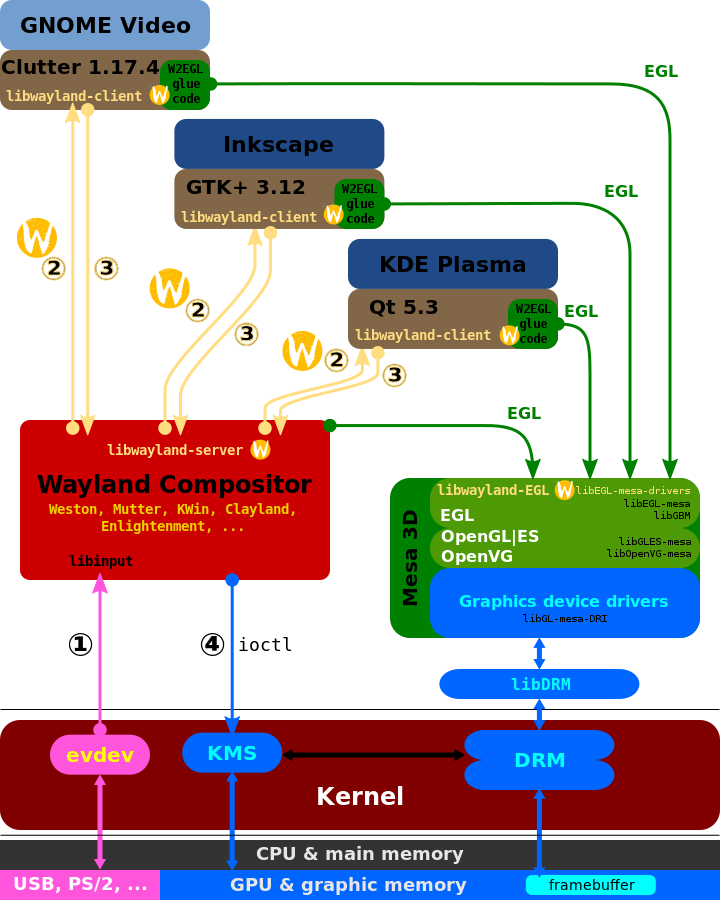
    5. Wayland 就是 client-server 的 protocol. 下圖取材自 WIKI [1].
    6. Weston 是一種 Wayland Compositor 的架構 (reference design). 其他架構包括: Lipstick、EnlightenmentKWinMutterClayland...等等. [1]
    7. Westeros 是擴充的 Weston 版本.

    Wayland_display_server_protocol.svg_

    Westeros 有什麼不一樣呢?在 github  [2] 上說了:

    Wayland Compositor

    Westeros is a light-weight Wayland compositor library. It uses the Wayland protocols, and is designed to be compatible with applications built to use Wayland compositors. It implements a library that enables an application to create one or more Wayland displays. It supports the creation of normal, nested, and embedded wayland compositors. A normal compositor displays its composited output to the screen, while a nested compositor sends its composited output to another compositor as a client surface. An embedded compositor allows the application that has created the embedded Wayland compositor to incorporate its composited output into the applications UI. This allows for easy integration of the UI of external third party applications into an applications’s UI.

    關鍵字是可以產生多個 display. 正常的 display 就是一路 UI. nested 版本可以把一個 compositor 做出的 display 加到另外一個 compositor. embedded 版本做出的 display 可以加到 APP 的 UI, 也就是 APP 的 UI 不用完全透過 Wayland 來畫圖. 這樣看來, Westerns 比普通版的 Weston 要有彈性多了.

    [REF]

    1. https://en.wikipedia.org/wiki/Wayland_(display_server_protocol)#Weston
    2. https://github.com/rdkcmf/westeros

DiskPart 小註解

昨天晚上電腦有點卡卡的, 仔細一瞧有個目錄底下的子目錄不見了 ? 看看已使用的大小還是沒變, 於是就用 Windows 10 內建的 “檔案總管 -> 滑鼠右鍵 -> 內容 -> 工具 -> 檢查錯誤" 來確認. 發現果然硬碟是有問題了.

大概 Linux 用多了, 我突發奇想, 想來個 unmount 再 mount. 所以在磁碟管理裡面對這顆硬碟下 “離線". 沒想到離線之後就沒辦法連線了, 有一次算是成功, 系統問我這顆硬碟是 MRT 還是 GPT? 哦…我哪記得啊? 乾脆重新開機, 接著整台都開不起來了, 宣布倒站一天!

我想大概是硬碟太多顆要檢查, 先全部拔光光再重開, 果然十分鐘之內就開完了, 剩下 RAID 還再慢慢自我修復. 只是這樣一開一關, 磁碟的主人就換成陌生的一串機碼了. 整顆硬碟變成 readonly, 想重設擁有者也沒辦法.

上網查到 Win 10 內建就有個強大 (但是難用) 的 diskpart 命令列指令可以去除 readonly 屬性. 微軟的官網只列出指令, 沒有 step by step 範例 [1]. 網友的文章 [2] 寫得比較清楚, 但沒有把關鍵的指令寫出來. 實際上在終端機裡面, 看到的是這樣:


H:>diskpart

Microsoft DiskPart 版本 10.0.14393.0
Copyright (C) 1999-2013 Microsoft Corporation.
在電腦: CASHBANK
DISKPART>

…然後咧? 然後可以打 dir 或是 help, 打what…什麼都可以, 指令就會列出來, 但是按 enter 沒用,只是一直換行..

Microsoft DiskPart 版本 10.0.14393.0

ACTIVE – 將選取的磁碟分割標記為使用中。
ADD – 新增一個鏡像到一個簡單磁碟區。
ASSIGN – 指派一個磁碟機代號或掛接點到選擇的磁碟區。
ATTRIBUTES – 操縱磁碟區或磁碟屬性。
ATTACH – 連結虛擬磁碟檔案。
AUTOMOUNT – 啟用和停用基本磁碟區的自動掛接。
BREAK – 中斷一個鏡像組。
CLEAN – 從磁碟上清除設定資訊或所有資訊。

COMPACT – 嘗試縮小檔案的實體大小。
CONVERT – 轉換不同的磁碟格式。
CREATE – 建立一個磁碟區、磁碟分割或虛擬磁碟。
DELETE – 刪除一個物件。
DETAIL – 提供一個物件的詳細資料。
DETACH – 中斷連結虛擬磁碟檔案。
EXIT – 結束 DiskPart。
EXTEND – 延伸一個磁碟區。
EXPAND – 擴充虛擬磁碟上的最大可用空間。
FILESYSTEMS – 顯示磁碟區上目前及受支援的檔案系統。
FORMAT – 格式化磁碟區或磁碟分割。
GPT – 指派屬性給選取的 GPT 磁碟分割。
HELP – 顯示一個命令清單。
IMPORT – 匯入磁碟群組。
INACTIVE – 將選取的磁碟分割標記為非使用中。
LIST – 顯示物件的清單。
MERGE – 合併子磁碟與其父系。
ONLINE – 把目前標記為離線的物件設成連線。
OFFLINE – 把目前標記為連線的物件設成離線。
RECOVER – 重新整理選取封裝中所有磁碟的狀態。
嘗試在無效封裝中的磁碟復原,並重新同步具有過時網狀
磁碟區或同位檢查資料的鏡像磁碟區與 RAID5 磁碟區。
REM – 不做任何事。這是用來註解指令碼。
REMOVE – 移除磁碟機代號或掛接點指派。
REPAIR – 用失敗成員修復 RAID-5 磁碟區。
RESCAN – 重新掃描電腦來尋找磁碟和磁碟區。
RETAIN – 在簡單磁碟區下放置一個保存磁碟分割。
SAN – 顯示或設定目前開機之 OS 的 SAN 原則。
SELECT – 移動焦點到物件。
SETID – 變更磁碟分割類型。
SHRINK – 縮小有選取的磁碟區。
UNIQUEID – 顯示或設定 GUID 磁碟分割表格 (GPT) 識別碼或
磁碟的主開機記錄 (MBR) 簽章。

左看右看, 我應該打 list

DISKPART> list

Microsoft DiskPart 版本 10.0.14393.0

DISK – 顯示磁碟清單。例如,LIST DISK。
PARTITION – 顯示所選取磁碟上的磁碟分割清單。
例如,LIST PARTITION。
VOLUME – 顯示磁碟區清單。例如,LIST VOLUME。
VDISK – 顯示虛擬磁碟清單。

還差一點點, 我應該要打 list disk, 這樣所有的硬碟就列出來了.

DISKPART> list disk

磁碟 ### 狀態 大小 可用 Dyn Gpt
——– ————- ——- ——- — —
磁碟 0 連線 1863 GB 0 B *
磁碟 1 連線 931 GB 0 B *
磁碟 2 沒有媒體 0 B 0 B
磁碟 3 沒有媒體 0 B 0 B
磁碟 4 連線 3726 GB 7168 KB
磁碟 5 連線 3726 GB 7168 KB
磁碟 6 沒有媒體 0 B 0 B
磁碟 7 沒有媒體 0 B 0 B
磁碟 8 連線 2794 GB 0 B *
磁碟 9 沒有媒體 0 B 0 B
磁碟 10 連線 2794 GB 0 B *

然後我就選 disk 9, 怎麼知道是 9 號呢? 要到 “電腦管理" 底下去選 “磁碟管理". 這個電腦管理本來在控制台, 但 Win 10 把它藏起來了.  我是到 “設定" 裡面搜尋 “控制台", 等它出來之後, “釘選到工作列". 以後就可以直接點.

後面就跟網路上說的一樣. 確實能消除 readonly 屬性. 也能把磁碟的擁有者改回自己了.

DISKPART> select disk 9

磁碟 9 是所選擇的磁碟。

DISKPART> att disk clear readonly

磁碟屬性已順利清除。

[REF]

  1. https://technet.microsoft.com/zh-tw/library/cc766465(v=ws.10).aspx
  2. https://read01.com/6PMy6k.html


Rec. ITU-R BT.2100 小註解

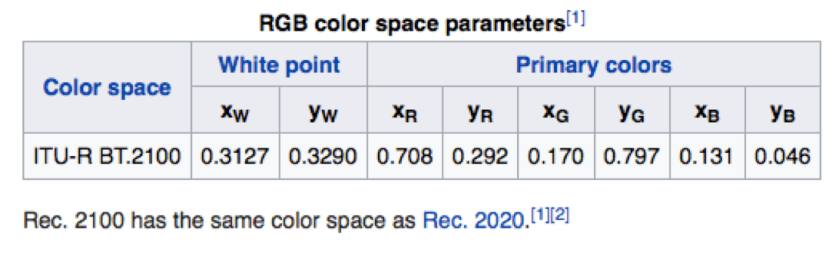
又來一個新的 HDR 規格 – BT.2100 [1]. 難道它能讓我們看到更多顏色?不!比較 WIKI 2020 和 WIKI 2100 的 CIE 1931 chromaticity diagram, 兩者可是長得一模一樣.

Chroma那是有更多 bit ?也不是, 兩者都可以到 12 bit. 主要的差異是 BT. 2020 只定義了色域, 沒有定義 HDR 的 OTP (optical transfer function). 而 BT. 2100 明定了 HDR, 因此也有人說 BT. 2100 = BT. 2020 + HDR [2].

BT. 2100 的 HDR 有兩種選擇:

  1. PQ (Perceptual Quantization), 用於 HDR10 和 Dolby Vision.
  2. HLG (Hybrid Log-Gamma)

在 resolution 的方面, 它定義了 1080, 4K, 8K. Frame rate 則支持常用的幾種. 24, 25, 30, 50, 60, 100 and 120 fps (frames per second).

回過頭來看什麼是 PQ? PQ 是SMPTE ST 2084 中所描述的 HDR transfer function.一如它的名稱, perceptual 是感知的, quantization 是量化. 因此這條轉換曲線是根據人的視覺所覺能力所決定的. 在 ref [1] 裡面可以查到 OETF (Optical to Electro transfer function), EOTF 和 OOTF.

HLG 比較著重和 SDR 的相容性, 在 SDR 這段區間裡, 兩者沒有太大的差異. 因此公式也簡單多了. 這樣的好處是 HDR 的片子放在 SDR 的電視上看也不容易失真 [4]. 若是用 PQ 的HDR 播在 SDR TV 上就會變成慘白狀.

hlg-at-sdr-tv

[Note] 上圖擷取自 WIKI [3].

再來解釋 PQ10 和 HLG10, 它和 HDR10 有何不同呢? HDR10 是完整的規格, 所以有色域 (BT. 2020), 有 EOTF (也就是 PQ),  有 10 bit, 有 metadata (BT. 2086, MaxCLL, MaxFALL). PQ10 和 HLG10 就只是 PQ 和 HLG 在 10 bit 的 EOTF/OETF 轉換方式.

其中, MaxCLL, MaxFALL 定義於 Blu-ray Disc 規格, 由於在後製的時候才能算出整個 program 的最大亮度, 故現場直播 (live program) 時, 這兩個值是 0.

  • MaxxFALL – Maximum Frame Average Light Level; this is the largest average pixel light value of any video frame in the program
  • MaxCLL – Maximum Content Light Level: this is the largest individual pixel light value of any video frame in the program

[REF]

  1. https://www.itu.int/dms_pubrec/itu-r/rec/bt/R-REC-BT.2100-0-201607-I!!PDF-E.pdf
  2. http://www.flatpanelshd.com/news.php?subaction=showfull&id=1467719709
  3. https://en.wikipedia.org/wiki/Hybrid_Log-Gamma
  4. https://tech.ebu.ch/docs/events/IBC2015/IBC_Fact_Sheet_HDR_Demo_Final.pdf

HTTPS 小註解

看臉書上說, 現在大部分的網站都用 HTTPS 了. 雖然說臉書假新聞多, 那我這個站呢? 我把我改 HTTPS 的心得跟大家也分享一下.

首先, XAMPP 就可以自行產生 key, 變成 HTTPS 的網站 [1]. Keyword 就是 makecert.bat 打下去就對了! 在交互式的輸入中, 除了 Common Name 要打 IP 或是 domain name 之外, 沒有什麼難的. 做完之後, 它自動會把三把 key 放到 apache/conf/ 下面的三個目錄:

ssl.csr 裡面放 server.csr
ssl.crt 裡面放 server.crt
ssl.key 裡面放 server.key

這樣第一階段就完成了. 第二步要確定 apache/conf/ 下的 httpd.conf 裡面, 

LoadModule rewrite_module modules/mod_rewrite.so

這行的註解 (‘#’) 被拿掉後, 用 https://www.cash.idv.tw 就可以連上我的網站了. 當然, 後面還有一些細節是要保護那些目錄? 這個我先略過不提. 我要講的重點是, 如果用 chrome browser  去連 https://www.cash.idv.tw, 它竟然把我的 https 用斜線劃掉了, 這樣看起來好丟臉啊! 

not-https

查了前人的文章 [2], 才知道 Chrome 會檢查憑證是否為第三方所認證的. 我們自己產生出來的 key, 當然不能說很有說服力, 有人證認確實比較好. 怎麼辦呢? 找到一個 SSL for free 可以解決這個問題 [3], 只要按照網站上說的, 產生 SSL key 應該不困難.

在這個過程中, 我發現我在 PCHOME 代管的 DNS, 只有註冊 http://www.cash.div.tw, 沒註冊 cash.idv.tw.  把這個問題修正了之後, 才能夠通過 SSL fro free 的測試. 如果一切順利, SSL for free 網站會生出三個檔案, 打包成一個 sslforfree.zip 下載.

這個 zip 檔解開之後, 會看到 ca_bundle.crt, certificate.crt, private.key 三個檔案. 看起來只要能用這三個檔案代替 XAMPP 的三個檔案, 那麼 Chrome browser 也不能再挑剔我的 key 沒有公信力了吧!

話雖如此. 那個對到哪個呢? 這訊息我 Google 不到, 畢竟用 SSL for free 的人和用 XAMPP 的人交集很少吧!? 那就只好自己來了. 雖然我好想靠別人哪~~~

根據 /apache/conf/extra/httpd-ssl.conf 裡面寫的, private.key 顯然就是 server.key

# Server Private Key:
# If the key is not combined with the certificate, use this
# directive to point at the key file. Keep in mind that if
# you’ve both a RSA and a DSA private key you can configure
# both in parallel (to also allow the use of DSA ciphers, etc.)
# ECC keys, when in use, can also be configured in parallel
SSLCertificateKeyFile “conf/ssl.key/server.key"

CA 是第三方認證的. 顯然是 ca_bundle.crt 那包, 要放到 ssl.crt, 我把 ca_bundle.crt 直接 rename 成 ssl.crt 下的 server.crt. 不 rename 改 config 檔也可以通.

# Certificate Authority (CA):
# Set the CA certificate verification path where to find CA
# certificates for client authentication or alternatively one
# huge file containing all of them (file must be PEM encoded)
# Note: Inside SSLCACertificatePath you need hash symlinks
# to point to the certificate files. Use the provided
# Makefile to update the hash symlinks after changes.
#SSLCACertificatePath “c:/Apache24/conf/ssl.crt/"
#SSLCACertificateFile “c:/Apache24/conf/ssl.crt/ca-bundle.crt"

最後是 certificate.crt, 難不成它就是  ssl.csr 下的 server.csr? 看起來也的確有對上.

# Server Certificate:
# Point SSLCertificateFile “conf/ssl.crt/server.crt"
# the certificate is encrypted, then you will be prompted for a
# pass phrase. Note that a kill -HUP will prompt again. Keep
# in mind that if you have both an RSA and a DSA certificate you
# can configure both in parallel (to also allow the use of DSA
# ciphers, etc.)
# Some ECC cipher suites (http://www.ietf.org/rfc/rfc4492.txt)
# require an ECC certificate which can also be configured in
# parallel.
SSLCertificateFile “conf/ssl.crt/server.crt"

把這三個檔案各自 rename 之後, Chrome 也就不抱怨我的 https 了. 測試了一下 http 和 https 都可以連上我的網站. 按照網路上的說法, 應該要把 http 的網址關掉, 然後只用 https 的網址. 或者把 http 的 request 都 redirect 到 https. 不過, 只要我打開 SSLRequireSSL, XAMPP 就開不起來了. 這個我還在研究中. 總之, 我把 Chrome 的紅字先劃掉了!

SSL for Free apache 目錄 重新命名
ca_bundle.crt ssl.crt server.crt
certificate.crt ssl.csr server.csr
private.key ssl.key server.key

2017/2/26 補充

如果要在後台強制使用 https, 參考 [4] 這篇, 在 wp-config.php 當中, 在 下面這段出現之前 (它通常在最後一行).

/** 設定 WordPress 變數和包含的檔案。 */
require_once(ABSPATH . ‘wp-settings.php’);

加入下面的 define. 因為有版本新舊的關係. 可以兩個都加.

define(‘FORCE_SSL_ADMIN’, true); /* 新版適用 */
define(‘FORCE_SSL_LOGIN’, true); /* WordPress version 4 以後就不用了 */

[REF]

  1. http://robsnotebook.com/xampp-ssl-encrypt-passwords
  2. HTTPS網站被Chrome打臉?
  3. SSL For Free 免費 SSL 憑證申請,使用 Let’s Encrypt 最簡單方法教學!
  4. Administration Over SSL

Philips HDR 白皮書小註解

根據 WIKI 的記載, HDMI 2.1 的規格來自於 Philips HDR 白皮書 [1]. 雖然這句話簡直不能說是中文: “HDMI 2.0A涵蓋HDR EOTF信令和靜態後設資料後設資料的動態是HDMI 2.1所涵蓋。" 那麼, 我們來看一下白皮書吧!

白皮書認為: 電視或影片大致分為 HDR 和 SDR 兩大類. 我們只需要壓出一種品質的片子, 然後帶一些參數, 就可以在 HDR 或 SDR 的電視上播放!  (白皮書的圖如下)

Philips-White-Paper-768x372

如果一開始就製作出 HDR 品質的片子, 那麼以 HDR 播出一定不會是問題. 至於怎麼產生出 SDR 的版本, 白皮書說這是 colorist 或 artist 要做的工作. 他們根據 frame 或是 scene 的場景轉換, 分別調整出對應的 content-dependent 的 tone mapping 參數. 然後把調好的參數, 根據定價 120 USD 的 SMPTE standard ST 2094-20 [2], 放進 video bit stream 的 SEI ( supplemental enhancement information) [3].  

class SEIToneMappingInfo : public SEI
{
Public:
 PayloadType payloadType() const { return TONE_MAPPING_INFO; }
 SEIToneMappingInfo() {}
 virtual ~SEIToneMappingInfo() {}
 Int m_toneMapId;
 Bool m_toneMapCancelFlag;
 Bool m_toneMapPersistenceFlag;
 Int m_codedDataBitDepth;
 Int m_targetBitDepth;
 Int m_modelId;
 Int m_minValue;
 Int m_maxValue;
 Int m_sigmoidMidpoint;
 Int m_sigmoidWidth;
 std::vector<Int> m_startOfCodedInterval;
 Int m_numPivots;
 std::vector<Int> m_codedPivotValue;
 std::vector<Int> m_targetPivotValue;
 Int m_cameraIsoSpeedIdc;
 Int m_cameraIsoSpeedValue;
 Int m_exposureIndexIdc;
 Int m_exposureIndexValue;
 Bool m_exposureCompensationValueSignFlag;
 Int m_exposureCompensationValueNumerator;
 Int m_exposureCompensationValueDenomIdc;
 Int m_refScreenLuminanceWhite;
 Int m_extendedRangeWhiteLevel;
 Int m_nominalBlackLevelLumaCodeValue;
 Int m_nominalWhiteLevelLumaCodeValue;
 Int m_extendedWhiteLevelLumaCodeValue;
};

至於調整參數時用的電視的 st 2086 規範中的參數, 當然也要放進去. ( The characteristics of the display used for grading or monitoring, such as peak luminance and black level, are added as SMPTE ST 2086 metadata to the video stream. )

另外一個變形是, 傳出 SDR 的 video bit stream, 並且帶上一些參數, decoder 端原則可以解出 SDR 版本, 並且透過計算產生 inverse dynamic range conversion 的 HDR 版本. 這些轉換原理不管壓成  SDR 或是 HDR bit stream 時都是一樣的. 但是為了確保在 decoder 端 (通常是 OTT 或是 STB) 可以把 SDR 再還原出 HDR, 在 encoder 端做 HDR 轉 SDR 的時候, 不能夠用到硬砍的方式 (hard clipping is not allowed).

上述的討論只限於 decoder 和 encoder 之間, 還沒有考慮到 HDMI. 畢竟 HDMI 只傳 raw data, 可想而知那些相關的係數都要透過額外的 HDMI 封包來傳. 在 HDMI 2.0 的時代, 我們通常是傳靜態的 ST 2086 metadata. 至ˊ於動態的部分, 目前 HDMI 的網站 [4] 還沒看到 2.1 的規格, 只看到 2.0b 而已.

[REF]

  1. http://www.flatpanelshd.com/downloads/philips_hdr_white_paper.pdf
  2. http://www.techstreet.com/standards/smpte-st-2094-20-2016?product_id=1922111
  3. https://hevc.hhi.fraunhofer.de/HM-doc/_s_e_i_8h_source.html
  4. http://www.hdmi.org/manufacturer/