DTCP Key Format 小註解

因為 OEM 在問, 所以我上網找了些公開的資料. DTCP (Digital Transmission Content Protection) 的概念類似 HDCP, 由 DTLA (Digital Transmission License Administrator) [1] 所維護. 顧名思義 DTCP 強調傳輸的部分.

版本又分成 DTCP [3] 和 DTCP2, “2″ 和 “1″ 不相容, DTCP2 主要是用來保護 4K, 8K 的 content. 舊版的的 DTCP 主要用來保護 HD 的影像. 再來就講到 key 的內容了, 首先分成 unique key 和 common key.

CK flag (1 bit): A value of zero indicates the device is using unique DTCP2 keying material
(Unique-key Device) and a value of one indicates that the device is using common keying material
(Common-key Device).
 

詳細的說明在 [4] 的 P.6, 本來每個 device 的 key 都要長得不一樣. 但是如果你是大戶買很多把的話, 就可以都用一樣的 key 比較方便, 這個叫做 common key. 當然 common key 被濫用的話, 必須要能夠被註銷. 這些規範寫在 Section 2.2 of the Procedural Appendix. F (p. 60).

2.3 Device Certificate and Device Keys. Device Certificates and Device Keys are necessary to
manufacture Licensed Products. These are generated under the direction of DTLA and, except in the
case that Adopter elects to use a Common Device Certificate and Common Device Key for certain
devices as described in the Procedural Appendix and Compliance Rules, are generated uniquely per
device. Without limiting any other provision of this Agreement, Adopter may not use the same
Device Key or Device Certificate in more than one individual unit or copy of any product or
component except for the use of Common Device Keys and Common Device Certificates in
accordance with Section 2.2 of the Procedural Appendix. F

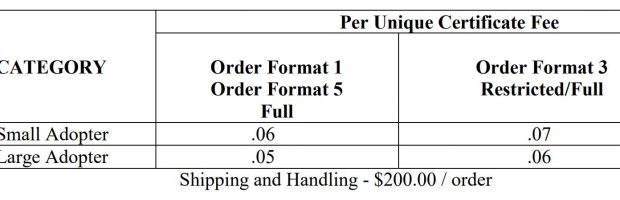
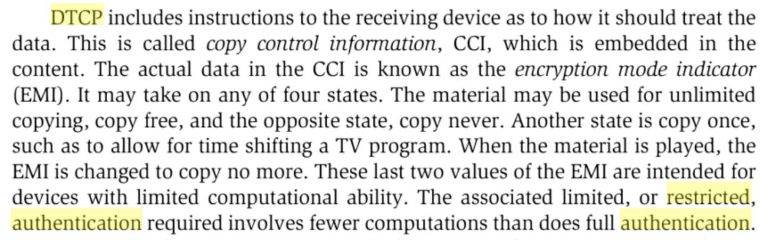
Unique key 在 DTCP 有三種 certificate format, 在 DTCP2 只有一種. DTCP 的三種 format. 定義在  RFC7562 [2]. Format 0 給計算能力比較有限的 device 用. Format 1 給計算能力強的 device 用, Format 3 就給有額外需求的 device 用 [3]. 看起來 embedded system 比較適合 format 0.

Certificate Format (4 bits). This field specifies the format for a specific type of certificate. Currently three
formats are defined:
o Format 0 = the Restricted Authentication device certificate format (See Chapter 5).
o Format 1 = the Baseline Full Authentication device certificate format.
o Format 2 = the Extended Full Authentication device certificate format (NOT ESTABLISHED2
).
o Other encodings are currently reserved.

DTCP certificates issued by [DTLA] to DTLA-compliant devices come in
   three general variations (see Section 4.2.3.1 of [DTCP]):

   o  Restricted Authentication device certificate format (Format 0):
      Typically issued to devices with limited computation resources.

   o  Baseline Full Authentication device certificate format (Format 1):
      This is the most commonly issued certificate format.  Format 1
      certificates include a unique DeviceID and device EC-DSA public/
      private key pair generated by the DTLA.  (See Section 4.3 of
      [DTCP]).

   o  Extended Full Authentication device certificate format (Format 2):
      This is issued to devices that possess additional functions (e.g.,
      additional channel ciphers, specific device properties).  The
      presence of these additional functions is indicated by the device
      capability mask as specified in Section 4.2.3.2 of [DTCP].  Format
      2 certificates also include a unique DeviceID and device EC-DSA
      public/private key pair generated by the DTLA (see Section 4.3 of
      [DTCP]).

   The mechanism specified in this document allows only Formats 1 and 2
   DTCP certificates to be exchanged in the supplemental data message
   since it requires the use of the EC-DSA private key associated with
   the certificate.

既然 DTCP2 用來保護 4K, 8K 的內容, 當然就不用顧及老弱殘兵的計算能力了. 按照 2018 年的 DTCP2 spec., 就只有 format 1 一種.

Format (4 bits): This field specifies certificate format and currently only one format is defined:
116 : DTCP2 Device Certificate Format 1
 

[Ref]

1. https://www.dtcp.com/default.aspx

2. https://tools.ietf.org/html/rfc7562#page-6

3. http://www.dtcp.com/documents/dtcp/info-20130605-dtcp-v1-rev-1-7-ed2.pdf

4. http://www.dtcp.com/documents/licensing/dtla-adopter-agreement.pdf

ECM 與 EMM 小註解

初學的時候, 對這兩個名詞很容易搞混, 只是硬記.

ECM = Entitlement Control Messages

EMM = Entitlement Management Messages

後來看了 RDK Summit 2019 的文件, 覺得解釋得很好. 在腦海中翻譯成中文後就更加心領神會了.

首先我有一個受保護的資料要解擾, 因此用一個 Control Word 來解擾它. 解擾和解密的差異在於 Control Word 會一直換, 達到擾亂的目的. 就算一時可以矇對, 可能每隔 15 秒就換一次 Control Word. 

Control 是控制的意思. 我們那屆的控制系, 班服背後就寫著大大的 “Everything is under Control" , 穿起來很風光. 而我們電信系的班服上的 “Commuication" 因為少了一個 n 所以很少人穿.  咳… 管理 Control word 的資訊當然就是 Control Message. 因為表彰管理權限, 給予權利, 所以是 Entitlement Control Message.

ECM –> Decrypt –> Control Word 

Scrambled data + Control Word –> Discramble –> Clear data

控制是針對普遍性, 但管理要考慮獨特性. 因此在控制的上面要多一層管理. 對事情、對人、對 key 都用這個聯想, 就變好記了. 國有國法、家有家規, 凡事都按照規定來做是控制, 而上面要有一個 Manager 就是要管理差異性.

EMM + Device Unique Key –> ECM key

ECM + ECM Key  –> Dercypt –> Control Word

Scrambled data + Control Word –> Discramble –> Clear data

YOLO V3 + Tensorflow V2 小筆記

去年我寫了一個專利, 到現在專利事務所還沒完成申請流程, 這樣我就不能公開啦! Anyway, 我來研究實作技巧吧.

首先, 我需要 YOLO V3. 前幾年研究的 Facenet 是用 Tensorflow 1.10, 現在上網一查, 人家已經用 Yolo V3 搭 Tensorflow V2 [1] 了. 首先需要 TF V2 [2]. 然後用上次的老招升級成 tensorflow-gpu

pip3 install --ignore-installed --upgrade tensorflow-gpu

此時遇到下面 error

distributed 1.21.8 requires msgpack, which is not installed.

用 pip3 install msgpack 解決.

接著在 Yolo V3 的安裝過程中, 需要多安裝 git for windows, 這可以參考 [3]. 至於 wget 在 Anaconda3/Lib 底下有.

一切搞定後, 進入 Anaconda3 的 TF2 (自己取的) 虛擬環境, 進行 Yolo v3 的訓練. 此時會報一個錯. 

File "C:\AI\Anaconda3\envs\TF2\tensorflow-yolov3\core\config.py", line 14, in <module>
from easydict import EasyDict as edict
ModuleNotFoundError: No module named 'easydict'

這時只要安裝 easydict 就好, 就可以堂堂跑 Yolo V3 了. 看樣子也真的有去找 GPU.

PS C:\AI\Anaconda3\envs\TF2\tensorflow-yolov3> python train.py
2020-03-04 23:31:09.283568: I tensorflow/core/platform/cpu_feature_guard.cc:141] Your CPU supports instructions that this TensorFlow binary was not compiled to use: AVX2
2020-03-04 23:31:10.297903: I tensorflow/core/common_runtime/gpu/gpu_device.cc:1411] Found device 0 with properties:
name: GeForce GTX 1050 major: 6 minor: 1 memoryClockRate(GHz): 1.493
pciBusID: 0000:02:00.0
totalMemory: 2.00GiB freeMemory: 1.61GiB
2020-03-04 23:31:10.345495: I tensorflow/core/common_runtime/gpu/gpu_device.cc:1490] Adding visible gpu devices: 0

接下來就是去洗澡, 看要多久才會 train 完. 可是, 六分鐘護一生之後, Python 把環境建好, 開始讀檔案要 training 時就出錯了. 原來是個豬頭 bug 把路徑名稱寫錯, 這題還研究了半天, 以至於學會了 os.path.normpath, os.path.join 的用法…

重新起跑後不久, 又遇到了 memory 不足的問題:

OP_REQUIRES failed at gpu_swapping_kernels.cc:72 : Resource exhausted: OOM when allocating tensor with shape[1024] and type float on /job:localhost/replica:0/task:0/device:GPU:0 by allocator GPU_0_bfc

這算是老問題了. 我的 Notebook 只有 2GB GPU RAM, 普通的 Yolo V3 要 4GB DDR, 所以應該要用 tiny 版本的 Yolo 才有機會. 此時找到 [4] 這篇滿實用的, 介紹得很清楚, 每個 model 要用多少 GPU RAM. 雖然它是用 Darknet, 但也有豐富的連結到其他 framework. 因此下一篇我將轉往 CPU only 或 Yolo Tiny 的方法.

另外就是下次買 Graphic card 做 AI 實驗, 內建 GDDR 的大小的重要性遠勝過計算能力. 能夠有 4GB free 就可以, 因此最好是內建 6 GB 吧, 不然就是要兩張卡了. 兩張卡的用法可以參考 tensorflow 官網 [5].

ˋ[Note]

  1. https://github.com/YunYang1994/tensorflow-yolov3&nbsp;
  2. https://medium.com/@shaolinkhoa/install-tensorflow-gpu-2-0-alpha-on-anaconda-for-windows-10-ubuntu-ced099010b21
  3. https://gitforwindows.org/
  4. https://gitee.com/suiyifan/darknet
  5. https://www.tensorflow.org/

Code Obfuscation 小筆記

我先跳做 code obfuscation (程式模糊化) 的目的, 假設大家都知道 why (為何而戰), 這裡只筆記 what and how? 

根據 [1], 我們可以做三種模糊化:

  1. Data Obfuscation
  2. Layout Obfuscation
  3. Control Obfuscation

Data obfuscation 是我們最熟悉的模糊化方式, 它是指對於變數名稱, 或者資料型態做修改. 事實上, 只要把 binary 中的 symbol strip 掉, 基本上名稱就變得亂七八糟了. 做法有二:

(1) compiler option [2]. 最厲害是 gcc 下開到 --strip=all. For object modules, this option removes all debug, comments, notes and symbols from the ELF file. For executables, this option works the same as --no_linkview.

(2) 用 command line 程式 off line 做 strip [3]. 最厲害也是開到 strip --strip=all, 不過以我粗淺地觀察, command line 多了針對特定 section 的操作, 而不是只把 section 分為 debug, comment, localsymbol, note…這幾種而已, 例如:

-R sectionname--remove-section=sectionname

附帶一提, section 的用法可以參照 ELF (Executable and Linkable format or Extensible Linking format) [4].   一個 ELF (*.o, *.so) 理所當然有一個 ELF header, 底下又分成 program header table, section, section header table 三個部分. 在 section header table 裡面就會記錄每一筆 section 在 image 中的那個位置 (offset).

至於對 data 的混淆, 個人有一點經驗可以分享. 上個世紀我做過 reverse engineering, 有一次我看到 binary 中有一串數字

5FFD:07D7 46 17 5D 74 D1 45 C7 3F dd 3FC745D1745D1746h ; 2/11
5FFD:07DF 1C C7 71 1C C7 71 CC 3F dd 3FCC71C71C71C1Ch ; 2/9
5FFD:07E7 92 24 49 92 24 49 D2 3F dd 3FD2492492492492h ; 2/7
5FFD:07EF 9A 99 99 99 99 99 D9 3F dd 3FD999999999999Ah ; 2/5
5FFD:07F7 55 55 55 55 55 55 E5 3F dd 3FE5555555555555h ; 2/3
5FFD:07FF 00 00 00 00 00 00 00 40 dd 4000000000000000h ; 2

因為太有規律了, 所以可以看出是 2/(2N+1) 的序列, 也就是:

2 * (1+1/3+1/5+1/7...)

此時搭配引用這段數字的代碼, 就可以看出是在計算:

2 * (x + x^3/3 + x^5/5 + x^7/7 + ....)

= ln(1+x) - ln(1-x)

= ln ((1+x)/(1-x))

諸如此類. 如果當初原作者把參數打亂一下, 我想破頭也很難想出來. 


Layout Obfuscation 是指修改 source code 的長相, 例如調整排縮 (indentation), 亂加 comment, 對 symbol 取怪名, 隨意插入不影響執行的關鍵字 [5]. 這對於已經編成 ELF 的程式當然沒用, 但是對於程式碼可直接執行的 java script 就有幫助.

Control Obfuscation 是指修改 code 的 statement 表示方式. 例如加入執行不到的 dead code, 該 call function 時把它的內容整個貼上來, 只用一個 function 但是把整包 library 塞進去. 看來這個手法主要是在 binary 的狀況下適用.

基本上, 如果做 binary release 可以用手法 1 和 3. 做 source code release 可以用手法 2. 不過接手這種 source code 的人應該心中 OOXX 吧…

[Note]

  1. Introduction to Code Obfuscation
  2. http://www.keil.com/support/man/docs/armclang_ref/armclang_ref_pge1362128923577.htm
  3. https://sourceware.org/binutils/docs/binutils/strip.html
  4. https://en.wikipedia.org/wiki/Executable_and_Linkable_Format
  5. https://codeobfus.files.wordpress.com/2010/04/layout-obfuscations.pdf

升級 PHP, Debug 中

Debug 中. 已知 bug 包括格式亂掉. 有時文章最後會出現 ]]>, 這是因為 HTML 格式轉換多出來的東西

目前想到的解法就是到後台 phpmyadmin 去修改, 包括會讓第一句話字變小, 甚至不能編輯的

<![CDATA[

以及文章最後多出來的

]]>

替換掉. 

最神奇的是很多文章的圖不見了! 例如本來叫做 ABC-1.jpg, 升級 XAMPP, PHP 之後, 莫名被改成 ABC-1-1.jpg, 所以就沒有圖了. 這個要靠人工去改, 可能頭髮都白了 (呃, 已經有不少白頭髮了), 但是直接用 phpmyadmin 去改, 一下字就可以完成!

還有就是右邊的小工具不見了, 這個雖然救得回來, 但是有些相容性的問題. 本來彩券選號程式寫得好好的, 現在 JavaScript 的關鍵字居然只能全部用小寫!? 哇, 不升級一下還不知道自己落伍了.