DAC 小註解

講到 DAC, 最先浮現腦海的一定是 digital analog converter. 然而, 偏偏就是有人 … 繼續閱讀「DAC 小註解」

講到 DAC, 最先浮現腦海的一定是 digital analog converter. 然而, 偏偏就是有人喜歡把自己的東西命名為更慣用的名詞, 藉以拉抬知名度. 此處的 DAC 是指 downloadable application container. 也就是可下載的 container.
關鍵字 container 的宗旨在於把應用程式封裝在一個容器中, 於是它幾乎不受外在環境設定的影響. 比方說 docker [2]. 當然徒 container 不足以自行, 先要 porting 好一個內應, 也就是 docker engine. 接著才能承上啟下.
docker-768x662
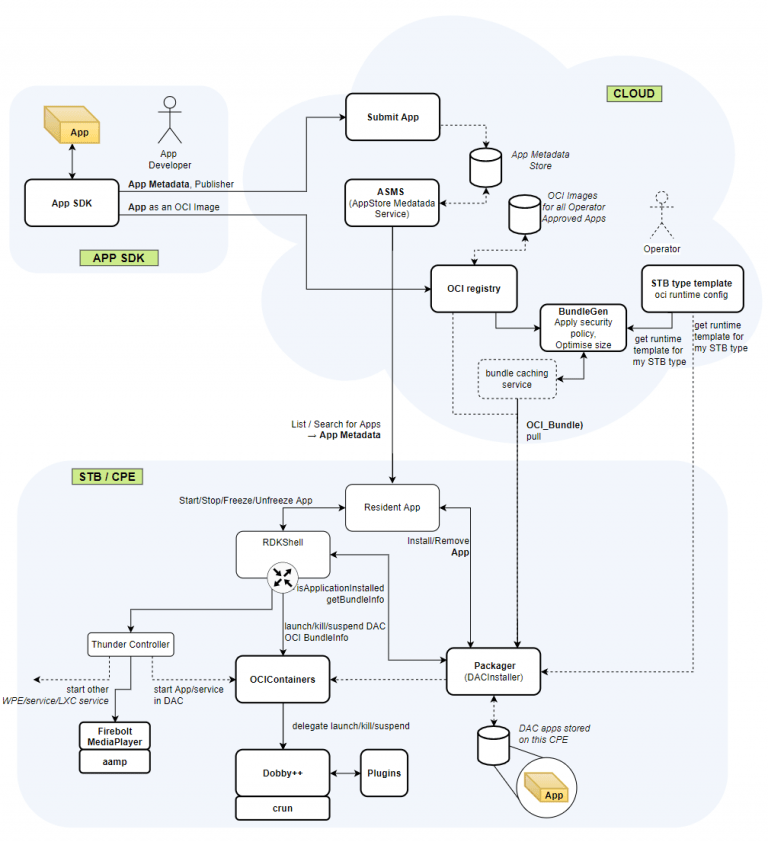
至於 DAC 則是 Comcast, Sky, Liberty Global, Metrological (已併入 Comcast) and Consult Red 所開發的一套 container 系統. 除了 Consult Red 是僅存的軟體服務公司, 其他都變成運營商了 – 也就是對應台灣的凱擘, 中華電信. 下圖右上角這塊 app store 的雲端, 左上角是 APP SDK, 下方是接受 APP 的 device, 像是 STB, 或者電信業名詞叫 CPE.
dac-768x842
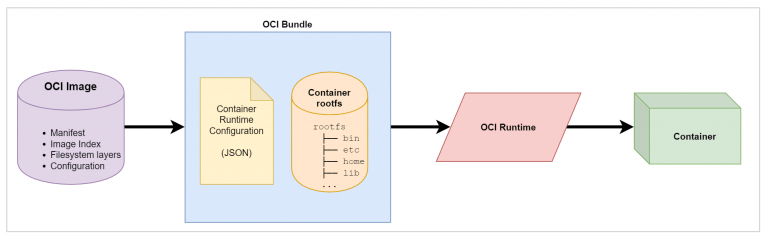
下載的 APP 為何能動? 在這裡的共通介面就是 OCI (Open Container Initiative ) [3]. 一套 OCI Image 被下載時, 會在雲端被打包為 OCI bundle. 通常只是壓縮, 但也可以被加密. Pull 到 CPE 後由 DAC installer (packager) 打包成 OCIContainer.
OCI 中除了 OCI Image 外, 另外一個角色是 OCI runtime. 它的用途在於安裝 container 到特定 file system 上, 它也放在 OCI bundle 的裡面. 實做方式有 Crun 和 Runc 兩種. 看官您覺得這命名鬧不鬧? 兩種方式各有支持者, Runc 是 RDK 聯盟採用的版本, 優點是體積小.
OCI-768x239
OCI define both a runtime specification and an image specification. The Runtime Specification outlines how to run a “filesystem bundle” that is unpacked on disk. The OCI image is used for packaging containers in a platform-agnostic way that can be easily distributed. At a high-level, an OCI implementation would download an OCI Image then unpack that image into an OCI Runtime filesystem bundle. At this point the OCI Runtime Bundle would be run by an OCI Runtime.
當然在 RDK 環境, APP 還是會由 RDK shell 控管. RDK shell 也管第一章流程圖左邊的 thunder container, 但這不在主題中先跳過. 其他還沒解釋到的剩下 Dobby [4].
Dobby 是哈利波特裡面的家庭小精靈. Well,.. RDK 聯盟的人有一票是冰與火之歌的劇迷, 所以新技術的名字都取自劇中的大陸, 例如 Westeros, ESSOS, …etc. 幸好 Dobby 是 Sky 的技術, 英國人當然要支援國貨.
Dobby 不是 container, 而是 container management 的 daemon. 它用來管理 container 的 lifecycle (start, stop, …etc.), 它的附加功能 (plugins) 還包括這些:

  • Advanced container networking support with NAT and both IPv4 and IPv6 support. Allows for easily adding iptables rules to allow/prevent traffic flow in and out of container
  • GPU memory limiting (providing the kernel has the appropriate support)
  • Container log management to either files or directly to journald
  • Loopback storage mounts to add persistent, isolated storage to containers
  • IPC support between containers/host by allowing access to the host dbus inside containers

[Note]

  1. https://wiki.rdkcentral.com/pages/viewpage.action?pageId=113967683
  2. https://www.docker.com/resources/what-container
  3. Open Container Initiative 
  4. https://wiki.rdkcentral.com/display/ASP/Dobby

ATSC A/85 中的 DialNorm 和 DRC

客戶又有新的 audio 專家來開會了, 只好考前猜題準備一下相關背景知識.

首先是整體音量的方面, 這裡有一篇中文的介紹非常棒 [3]. 看了以後對 audio normalization 會有基本的了解. 計算音量的方式有 A-weight (acoustic) 和 K-weight (單純對頻域 weighting), 把整片每個聲道掃完就會得到平均音量 [6]. ITU-R BS.1770 的公式 (2) 給了一個測量 loudness 方法 [6], 它的另外一個主題是測 True Peak.

接下來專注討論人聲的部分, 在 objective audio 的時代, 據說聲音該大聲就大聲, 該小聲就小聲, 但人聲必須是正常而且受到規範的 (CALM) [7]. CALM 言明要規範的是 perceived loudness, 然後又說 “Perceived loudness compliance is based on Dialog
Normalization – dialnorm. Dialnorm is defined in ATSC A/85″, 所以 DialNorm = Perceived loudness. 

DialNorm 是一個 metadata. 它的值介於 0~31, 也就是 -30~0dB 的音量 [1], 其中 0 是 reserved. DialNorm = 1 => 0dB, DialNorm = 31 => -30dB.  DialNorm = 12 表示很大聲, DialNom = 27 表示溫和 (soft). [2]

ATSC A/85 對 DialNorm 的規範是 -24 LKFS (想成 dB 就好) [4], 並且允許大約 ± 2dB 的量測誤差. 在 AC3 的碼流中會帶著這個 metadata, 而這裡的 0dB 是片源允許的最大音量. 我們可以透過調整電視音量, 讓電視的輸出的人聲落在 DialNorm 的上下區間 (comfort zone) [5].

根據 A/85.  電視節目製作人應該要保證他們的輸出都有適當的 DialNorm 控制, 包括所有片源都固定一個 DialNorm (fixed), 或者對每部片子預設一個值 (preset), 或者是可以從外部動態取得 (agile). 至於插片或是廣告的音量, 當然也要受到管制, 這也是 A/85 的目的. (This ATSC Recommended Practice (RP) provides guidance…to effectively control program-to-interstitial loudness.) 但 program-to-interstitial 的音量變化經常都是亂源. 

A/85 還講到 DRC (Dynamic Range Control) 有開關是為了要達到 reversible, 不然動態範圍壓下去就無法復原了. 在 P.26 提到: The AC-3 DRC system should not be relied upon to control program-to-interstitial loudness variations. 表示 DRC 也管不了廣告. 在 9.1.3 (P.29) 提到, DialNorm 是反映整部片子音量的準則, 所謂太大聲大小聲要拉起來壓下去, 都是依據 DialNorm 做判斷標準.

然後 9.1.4 解釋了 Dolby MS12 (密) 文件中沒有解釋的 profile, 幸好在公開的文件中就有講. AC3 定義了五種 profile, MS12 多一種 null profile. 但 9.1.5 有講到 DRC = “none", 也就是沒有 DRC 開關的選項.

• Music Light
• Music Standard
• Film Light
• Film Standard
• Speech

基本上這五種 profile 都跟 DialNorm 有關, 因為 Music 沒有對白, Speech 全部都是對白, 所以不同 profile 就代表不同的 DRC 調整. Light 跟不 light 的區別在於, light 版有比較多的 null area, 所以調的地方比較少. 

(The “Light” versions of the profiles have a much wider null area. Thus, gain reduction or expansion begins farther away from average program audio, resulting in less gain reduction or expansion than with the “Standard” version of the profile.) 

這也解釋了 [3] 裡面提到, Youtube 大約是 -13 LUFS, 而 Spotify 是 -14 LUFS (LHFS = LKFA). Youtube 基本上是 movie, Spotify 基本是 music. 如果對 Speech profile 開 DRC, 理論上會造成失真. 因為它已經全部都是人聲了, 壓了應該會破壞朗誦效果, 哈!

DRC 又可以分為有 metadata 和沒有 metadata. 有 metadata 就是前面講的這些, 沒有 metadata 的就像是 AGC (automatic gain control). 因為沒有 metadata, 所以是 irreversible.

[REF]

  1. https://en.wikipedia.org/wiki/Dialnorm
  2. https://www.atsc.org/wp-content/uploads/2015/03/Techniques-for-establishing-and-maintaining-audio-loudness-1.pdf
  3. 有關Audio normalization兩三事
  4. loudness, K-weighted, relative to full scale, measured with equipment that implements
    the algorithm specified by BS.1770. A unit of LKFS is equivalent to a decibel.
  5. Comfort Zone – the Comfort Zone is a range ( +2.4dB, -5.4dB) of the change to audio loudness that was found to be acceptable to a sample of listeners. The 0 dB point on the Comfort Zone scale is the average Target Loudness value or dialnorm of the channel.
  6. https://www.itu.int/dms_pubrec/itu-r/rec/bs/R-REC-BS.1770-4-201510-I!!PDF-E.pdf
  7. https://www.ensembledesigns.com/file_download/640/Ensemble_CALM_wp.pdf

災防告警廣播小註解

這篇的主題很難取, 因為可以用的名字太多了. 因為 COVID-19,  大家學到了細胞簡訊, 細胞廣播 [8], 類細胞簡訊等名詞, 它們都是用來傳遞重大災害的警示等等, 若搞不清他們的差異可以參考這篇 [1].

我主要想整理的是客戶可能需要的規格.

名詞 全名 Note
EAS [2] Emergency Alert Signaling radio and broadcast
WEA [9] Wireless Emergency Alerts wireless providers

EAS 是美國聯邦通信委員會 (FCC) [5] 所核准用的, 它的前前身和前身紀錄如下表. 最早用在國防用途, 後來轉為民生避難考量. 不意外最早只有廣播電台和電視需要支援.

名詞 全名 使用時間
EAS Emergency Alert Signaling 1997~now
EBS [6] or EANS Emergency Broadcast System
Emergency Action Notification System
1963~1997
CONELRAD [7]   1951~1963

但是有了手機和網路之後, 防守的範圍就更廣了. 美國人依然喜歡改朝換代. WEA 也是格式的名稱, 所以此廣播的正式名稱應該是 CMAS.

名詞 全名 使用時間
WEA Emergency Broadcast System ~now
CMAS Commercial Mobile Alert System = WEA
PLAN Personal Localized Alerting Network  before

每個國家隊細胞廣播 (cell broadcast) [8] 的命名當然也不一樣. 不勝枚舉. 

名詞 全名 地區
EMA [3] Emergency Mobile Alerts 紐西蘭
WEA Wireless Emergency Alerts 美國
NL-Alert Netherlands Alert 荷蘭
EU-Alert EU Alert 歐盟

再來回頭講細胞廣播的格式. CAP [4] 是由 OASIS 所推出, 採 XML-based 的描述, 現在是 ITU-T X.3103 的標準. WEA 則是  Alliance for Telecommunications Industry Solutions (ATIS) 和 Telecommunications Industry Association (TIA) 所定的新規格, 特色包括能夠指定播放的區域. 多語言, 限時, 延時等等.

  • Flexible geographic targeting by using latitude/longitude “boxes” and other geospatial representations in three dimensions
  • Multilingual and multi-audience messaging
  • Phased and delayed effective times and expirations
  • Enhanced message update and cancellation features
  • Template support for framing complete and effective warning messages
  • Digital encryption and signature capability
  • Facility for digital images, audio, and video.
名詞 全名 Note
CAP Common Alerting Protocol 許多國家, 包括台灣
WEA Emergency Broadcast System 美國

[Note]

  1. https://www.bnext.com.tw/article/57390/what-is-pwc-warning-system
  2. https://en.wikipedia.org/wiki/Emergency_Alert_System
  3. https://en.wikipedia.org/wiki/Emergency_Mobile_Alert
  4. https://en.wikipedia.org/wiki/Common_Alerting_Protocol
  5. https://en.wikipedia.org/wiki/Federal_Communications_Commission
  6. https://en.wikipedia.org/wiki/Emergency_Broadcast_System
  7. https://en.wikipedia.org/wiki/CONELRAD
  8. https://en.wikipedia.org/wiki/Cell_Broadcast
  9. https://en.wikipedia.org/wiki/Wireless_Emergency_Alerts

Windows 10 打開 line in 的方法

在 Windows 7 的時候, 我可以從 Realtek 的混音管理程式打開 line in (線路輸入) 的通道.  雖然它有個副作用是 line 進到混音後, 變成 line in 有一次聲音, 混音後又有一次聲音, 兩個聲音必須關掉一個.

但是用了 Windows 10 就有趣了, 明明麥克風的音量條都會動. 但是就是聽不到聲音從喇叭出來. 上網找到微軟客服的回答 [1], 但實在和中文版介面對不起來.

To enable sound for the line-in connection
1. Open Audio Devices and Sound Themes by clicking the Start button, clicking Control Panel, clicking Hardware and Sound, and then clicking Sound.
2. Click the Playback tab, click Speakers, and then click Properties.
3. Click the Levels tab, and then, under Line In, click the Mute button to enable sound for the line-in connection.

按照上面的流程, 第一步走到這裡. 然後它少講了要按右邊側欄的"聲音控制台", 不然也看不到第二步講的東西. 

Audio-Control-620x200

第二說三步說要點喇叭 (speaker) 的內容 (property). 但是我又迷失了.  我最後是在聲音控制台 –> 錄製中找到 line in 可以 unmute. 把這個選項打勾就可以聽到 line in 的聲音出現在喇叭了.

unmute-768x624

[Note]

  1. https://answers.microsoft.com/en-us/windows/forum/all/line-in-speakers-and-microphone-line-in-not/de6d462e-9970-48b3-8c3c-e70e66ccc01b

DTCP Order Format 小註解

繼上次的 key format 之後, 又多了一個進階題叫做 order format. 根據 [1] 的 p. 20, 有 3 種 order formats. 價格也略有不同, 當然大客戶比較便宜 (large adopter) 是無庸置疑的. 為何 fomrat 3 比較貴呢?

dtcp-priceJPG-620x200

根據定義, order format 1/3/5 的差異可以用 certificate (證書) / key 和 full / restricted 的排列組合來表現. 如下表, order foramt 3 的範圍最廣, license fee 也就最貴, Order format 1 居中, Order foramt 5 的範圍最小. 

Certificate\Key Full Restricted
Full Order Format 1/3/5 Order Format 1/3
Restricted Order Format 3 Order Format 3

根據 [1] 的 P.2, 證書和 key 的說明如下:

1.11 “Device Certificate” means a cryptographically encoded value which may be provided by
DTLA or its designee which authorizes a device to exchange certain Commercial Entertainment
Content.
1.12 “Device Keys” means cryptographic values which may be provided by DTLA or its designee
for use in devices, and include the “Private Device Key” and the “Public Device Key” and keys
associated with Restricted Authentication, all identified in the Specification.

DTCP 的 content 裡面包括一個 CCI (copy control information), CCI 裡面存放 EMI (encryption mode indicator) 來標記可以做甚麼樣的加密: copy free, copy never, copy once.

當 copy once 的 content 被 DTCP sink 處理的時候, 它的 EMI 若改記為 copy no more, 後續就可以只做 restricted authentication ([3] 的 P.891). 假如 content 被標記為 “copy never", 就必須做 full authentication.

dtcp-key-explain-768x240

當需要做 full authentication 時, source 和 sink 要互相檢查對方的證書 (certificate), 然後做 key exchange. Restricted authentication 時, sink 只要向 source 證明他們的 secret key 都一樣. 

full-or-restricted-620x200

因此對於一個 recorder 來說, 它可能可以支援 full authentication certificate (計算能力夠強), 也可能只支援 restricted authetication certificate (計算能力弱). 為了降低計算需求, 採用 restricted authetication 比較方便.  但 key 為何又分為 full 和 restricted 呢? 這牽涉到 full authentication 下要選擇 order format 1 或是 5?

我們可以發現 restricted certificate 就不能選 full key, 但是 full certificate 可以選 restricted key. 我推測這是給予 full certificate 去選擇要把 copy once 減一成為 copy never (full key) 或是單純降為 copy no more (restricted key) 的權利.

客戶又問了 AP 和 AL 是 0 還是 1? 

AL flag (1 bit). Additional Localization flag. The AL flag is set to value of one to indicate that the associated device is capable of performing the additional localization test, otherwise shall be set to value of zero.

AP flag (1 bit). Authentication Proxy flag. A device certificate with an AP flag value of one is used by a DTCP bus bridge device, which receives a content stream using a sink function and retransmits that stream to another bus using a source function5.

首先看 Localization flag 是什麼? 根據 [4], 它在 DTCP + 1394 的規格也出現過. IEEE 1394 就是那個已經沒人在用的 DV 規格, 但 localization 的精神應該是一樣的. 基本上, 它要避免利用網路來遠端破解 DTCP, 所以要用網路封包的 round trip time 來檢查 sink 是否在很遠的地方. 如果我們要遠端 debug DTCP-IP 的 content, 我當然希望是 AL = 0. 但正常的產品給 AL = 1 即可.

什麼是 authentication proxy 呢? 顧名思義, 這是不是一個 DTCP 橋接器, 把左手的 DTCP 送給右手. 做為一個 recorder 來說, AP 應該要為 0. 因為不能把收進來的 DTCP-IP 不解就直接寫進 time shift buffer 等下次用. 既然 DTCP-IP 和 Time shift buffer 的 key 不能共用, AP = 0 就好.

[Note]

  1. http://www.dtcp.com/documents/licensing/dtla-adopter-agreement.pdf
  2. ITU-T_J.95Y1999.PDF
  3. Multimedia Encryption and Authentication Techniques and Applications
  4. https://www.dtcp.com/documents/dtcp/info-20070615-dtcp-v1sf-rev-1-p-0.pdf